ChatGPT has been widely used by teachers for lesson planning, brainstorming, feedback, and resource creation since its public release. ChatGPT for Teachers is different from an ordinary personal account. It gives eligible educators a school-focused workspace with enhanced privacy protections, collaboration features, administrative controls, and access to many of ChatGPT’s premium tools.
The plan is currently free for verified US K–12 educators through June 2028. It is designed for teachers and school employees, not for students.
In this ChatGPT for Teachers review, I examine who qualifies, what the plan includes, how teachers can use its main features, and what schools need to consider before using it with classroom information.
What Is ChatGPT for Teachers?
ChatGPT for Teachers is a version of ChatGPT for employees of accredited K–12 schools and districts in the United States.
Eligible users include:
- Classroom teachers
- School staff
- Administrators
- School leaders
- District leaders
After verification, educators can create a workspace, join an existing one associated with their district, or invite verified colleagues from the same district.
Workspaces cannot include educators from different districts. District administrators can also claim their email domain, configure single sign-on, assign roles, and manage access.
OpenAI currently provides the plan free through June 2028. The company says it may introduce or adjust pricing after that period and will provide advance notice if the arrangement changes.
ChatGPT for Teachers at a Glance
| Area | What is included |
|---|---|
| Eligible users | Employees of accredited US K–12 schools and districts |
| Current access | Free through June 2028 |
| Student accounts | Not included |
| File support | Upload and analyse documents, presentations and spreadsheets |
| Research | Web search and Deep Research |
| Media creation | Image generation and voice mode |
| Reusable workflows | Custom GPTs, Projects and memory |
| Collaboration | Shared workspaces and resources |
| Connected services | Google Drive, Microsoft 365, Canva and supported apps |
| Data training | Workspace information is excluded from model training by default |
| Administration | SSO, role-based access, domain controls and analytics |
Features and access conditions were checked in October 2026 and may change.
How to Get ChatGPT for Teachers
Educators start through OpenAI’s K–12 verification process using a school or district email address.
The basic process is:
- Visit the ChatGPT for Teachers verification page.
- Sign in or create an account using a school email.
- Complete educator verification.
- Create a new workspace or join one connected to the district.
- Select a teaching role, subjects, and grade levels.
- Configure personal and workspace settings.
Workspace owners and administrators can invite other educators from the same district. Larger districts can request domain claiming, single sign-on, and additional organizational controls.
Verification confirms that someone works for an eligible institution. It does not automatically mean that every possible use of student information has been approved. Teachers still need to follow their district’s privacy policies and obtain any required authorization.
What Teachers Can Do with It
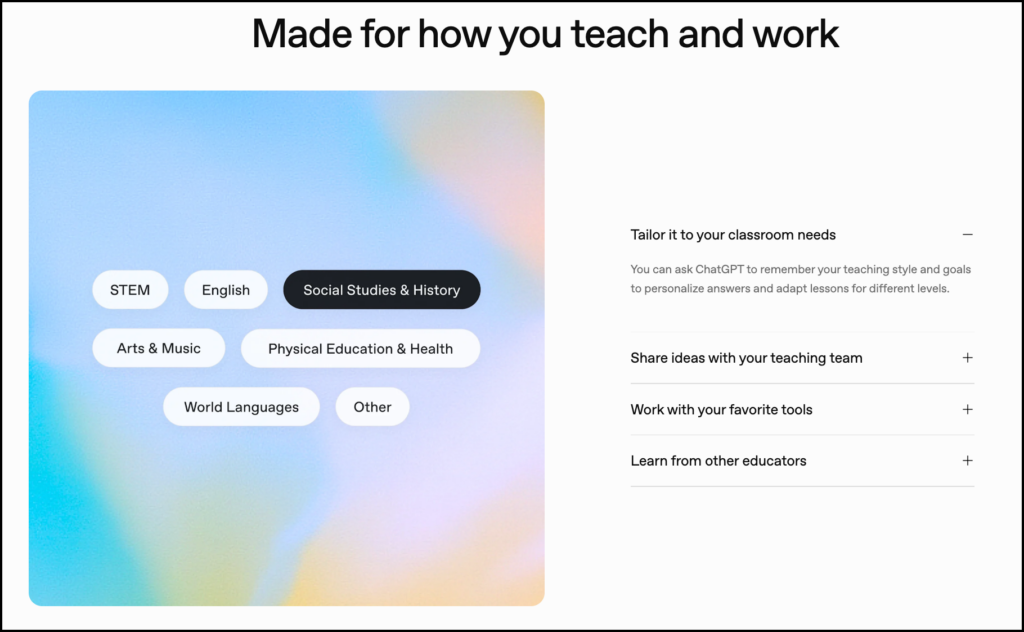
ChatGPT for Teachers includes many of the capabilities available in paid or organizational versions of ChatGPT.
Plan and Adapt Lessons
Teachers can provide a learning outcome, curriculum passage, grade level, and information about what students already know. ChatGPT can then help draft:
- Lesson outlines
- Discussion questions
- Worked examples
- Practice activities
- Exit tickets
- Homework tasks
- Extension activities
- Substitute-teacher plans
The quality of the result depends heavily on the context supplied. Asking for “a Grade 8 science lesson” leaves too many decisions to the system. Providing the curriculum outcome, available time, required evidence of learning, and known misconceptions produces a more useful starting point.
Teachers still need to verify the content and make sure the proposed activity actually addresses the intended outcome.
Work with Uploaded Files
Teachers can upload instructional materials and ask ChatGPT to summarize, reorganize, compare, or adapt them.
For example, it can:
- Convert a curriculum document into a unit outline
- Extract concepts from a reading
- Generate questions from an uploaded passage
- Compare two lesson plans
- Adapt instructions for different reading levels
- Turn notes into a study guide
- Review a draft rubric for unclear criteria
The ability to work from existing material is useful because it grounds the response in something the teacher has selected. However, ChatGPT may still omit details, misunderstand a table, or introduce information that does not appear in the source.
Analyse Classroom Data
ChatGPT can work with structured files such as spreadsheets. Teachers might use it to:
- Calculate class-level patterns
- Compare performance across questions
- Create a chart
- Identify items with high error rates
- Organize anonymous survey responses
- Summarize patterns in de-identified formative assessments
An observed pattern is not the same as an educational explanation. If several students answer a question incorrectly, ChatGPT may suggest a possible misconception, but the teacher must examine the responses and decide what the evidence supports.
Teachers should remove names and unnecessary identifying details unless their school has explicitly approved the use of identifiable records in the workspace.
Search the Web and Conduct Research
ChatGPT for Teachers includes web search and Deep Research capabilities. These can help educators collect current information, compare sources, and prepare background material for a lesson.
Deep Research can carry out a longer search process and return a report with references. This is useful for exploring an unfamiliar topic or gathering current examples, but teachers should open the cited sources and check whether they support the claims being made.
A reference can be real and still be poorly matched to a claim. Source verification remains part of the teacher’s work.
Generate Images
Built-in image generation can help teachers create draft:
- Story prompts
- Vocabulary illustrations
- Classroom posters
- Historical-scene concepts
- Visual discussion starters
- Icons and decorative elements
- Images for presentations or worksheets
AI-generated images require review for historical accuracy, representation, embedded text, and misleading details. They should also be labelled when students may otherwise mistake them for documentary images.
Use Voice Mode
Voice mode allows teachers to have spoken conversations with ChatGPT. This can support:
- Language-practice scenarios
- Interview rehearsal
- Oral-question practice
- Pronunciation exploration
- Role-playing activities
- Professional-presentation rehearsal
ChatGPT’s feedback should be treated as provisional. Pronunciation, dialect, and communication should not be reduced to a single model’s preferred way of speaking.
Custom GPTs and Reusable Teacher Workflows
A custom GPT is a version of ChatGPT configured with particular instructions, files, and functions.
Teachers or departments can create assistants for repeated tasks such as:
- Drafting rubrics in an agreed format
- Reviewing lesson plans
- Creating discussion questions
- Generating vocabulary activities
- Writing newsletters
- Adapting resources
- Checking whether tasks align with outcomes
Custom GPTs can also be shared within a school or district workspace. This can help departments use common templates and expectations.
The quality of a custom GPT depends on the instructions and resources used to build it. It should be tested across several examples before being adopted as part of a teaching workflow.
Projects, Memory, and Connected Apps
Projects allow educators to keep related chats, files, and instructions together. A teacher could create a Project for a course, unit, professional-development initiative, or school committee.
Memory can retain selected preferences, such as the teacher’s grade level, subject, preferred lesson structure, or formatting requirements. Teachers control these settings and can review or remove stored information.
ChatGPT can also connect with supported services, including Google Drive, Microsoft 365, and Canva. A teacher might retrieve curriculum files from Drive, draft a resource, and then use Canva to prepare the visual version.
Connected apps create additional data flows. Teachers should check what each connection can access and whether their district has approved it.
Collaboration and Administrative Controls
ChatGPT for Teachers is designed around a workspace rather than a collection of unrelated personal accounts.
Teachers can share resources and custom GPTs, while administrators can manage:
- Workspace membership
- User roles
- Single sign-on
- District domains
- Access to third-party GPTs
- Basic usage analytics
OpenAI also allows districts with more complex requirements to discuss enterprise arrangements, including additional data-management options.
The administrative controls will matter most when a district adopts the platform formally. Individual educators should be aware that a school-managed workspace may be governed differently from a personal account.
Privacy and Student Information
OpenAI states that information shared through ChatGPT for Teachers is not used to train its models by default. The offering includes FERPA-aligned protections and a Student Data Privacy Agreement.
Access to stored conversations is limited to authorized personnel who need it for technical support, abuse investigations, security, or legal compliance, along with contractors working under confidentiality requirements.
Deleted conversations are generally removed from OpenAI’s systems within 30 days unless legal or security obligations require longer retention.
These protections are meaningful, but they do not remove the teacher’s responsibilities. Before uploading student work or records, check:
- Whether the district has approved ChatGPT for the proposed use
- Whether identifiable information is necessary
- Which connected services can access the material
- How long conversations and files will be retained
- Whether administrators can view or manage workspace content
- Whether families or students need to be informed
When names are unnecessary, remove them.
Limitations of ChatGPT for Teachers
The most obvious limitation is geographic access. The plan is currently limited to employees of accredited US K–12 schools and districts. Teachers in Canada and other countries cannot generally register for it.
Other limitations include:
- Students cannot receive accounts through the plan.
- The free period is scheduled to end in June 2028.
- Features and model access may change.
- Outputs can contain factual errors or fabricated references.
- Generated assessments can include ambiguous questions or incorrect answer keys.
- Differentiated materials may unintentionally lower the intellectual demand.
- Web research still requires source checking.
- Image generation can reproduce stereotypes or inaccurate details.
- Uploading data into an approved workspace does not make every use educationally appropriate.
The range of features can also create its own problem. Teachers may begin using AI for tasks simply because the feature exists. The better starting point is the teaching purpose and the professional judgement the task requires.
Is ChatGPT for Teachers Worth Using?
For eligible US K–12 educators, ChatGPT for Teachers provides a generous collection of tools inside a protected school workspace. Its main strength is range: teachers can plan, research, analyse files, generate images, use voice, create reusable assistants, and collaborate with colleagues without moving among several separate platforms.
That breadth does not guarantee educational value. ChatGPT is most useful when teachers give it clear curriculum context, review its output, and retain responsibility for decisions about learners, assessment, and instruction.
Educators outside the United States can still use regular ChatGPT accounts, but they should not assume that those accounts provide the same contractual protections or administrative controls.
For a broader introduction, see my ChatGPT guide for teachers. You can also compare it with other platforms in my guide to ChatGPT, Gemini, and Claude for teachers.