


ChatGPT has moved well beyond the novelty stage. What started in late 2022 as a chatbot that could write passable essays has grown into a platform with dedicated education tiers, institutional partnerships across hundreds of universities, and a free plan specifically for K-12 teachers. OpenAI is clearly betting that schools and campuses will become long-term users, and the toolset reflects that ambition.
But the rapid pace of updates makes it hard for busy educators to keep track of what ChatGPT actually offers right now, what the research says about its effectiveness, and where the real limitations are. This guide walks through the current state of ChatGPT for education as of early 2026, with a focus on the features, pricing, research findings, and practical strategies that matter most for classroom teachers and higher ed instructors.
ChatGPT for Teachers: Free Access for K-12 Educators
The biggest development for classroom teachers came in November 2025, when OpenAI launched ChatGPT for Teachers, a dedicated workspace that gives verified U.S. K-12 educators free access to premium features through June 2027.
This is not a stripped-down trial. The free teacher plan includes unlimited messages with GPT-5.1 Auto, web search, file uploads, image generation with DALL-E, data analysis, memory features, and the ability to build Custom GPTs. As CNBC reported, the first cohort includes major districts like Dallas ISD, Fairfax County Public Schools, Houston ISD, and Fulton County Schools, along with the Delaware Department of Education supporting districts statewide.
The workspace is built with education-grade privacy protections, and conversations are not used to train OpenAI’s models. For teachers who have been using the free consumer version and worrying about data privacy, this dedicated plan addresses several of those concerns directly.
ChatGPT Edu: The University Tier
For higher education, OpenAI introduced ChatGPT Edu in May 2024, a version built specifically for universities to deploy AI across their campuses. It includes enterprise-level security, admin controls for managing users, and advanced tools like data analysis and vision capabilities, all with a guarantee that conversations are not used for model training.
In January 2026, OpenAI expanded further by announcing “Education for Countries” at the World Economic Forum in Davos. The initiative helps governments use AI to modernize national education systems, with an initial cohort that includes Estonia, Greece, Italy, Jordan, Kazakhstan, Slovakia, Trinidad and Tobago, and the United Arab Emirates.
Key Features Teachers Should Know About
ChatGPT’s feature set has expanded significantly since its early days. Here are the tools that are most relevant for classroom and instructional use.
Custom GPTs
This is arguably the most powerful feature for educators. Custom GPTs are specialized versions of ChatGPT that teachers can configure for specific courses, roles, or workflows. You set the instructions, upload reference files (like your syllabus, rubric, or course readings), and choose which tools the GPT can access. The result is a purpose-built assistant that responds within the boundaries you define.
OpenAI’s education team has highlighted 15 Custom GPTs transforming education in 2025, including Class Companion (which turns course notes into interactive tutors), Quiz and Exam Creator (which generates assessments aligned to learning objectives), and Lesson Planner (which builds structured lesson plans with embedded resources and hyperlinks).
For teachers, the value is in creating GPTs that know your curriculum. A high school biology teacher could build a GPT pre-loaded with state standards and their textbook chapters that generates quiz questions, lab discussion prompts, or differentiated reading guides on demand.
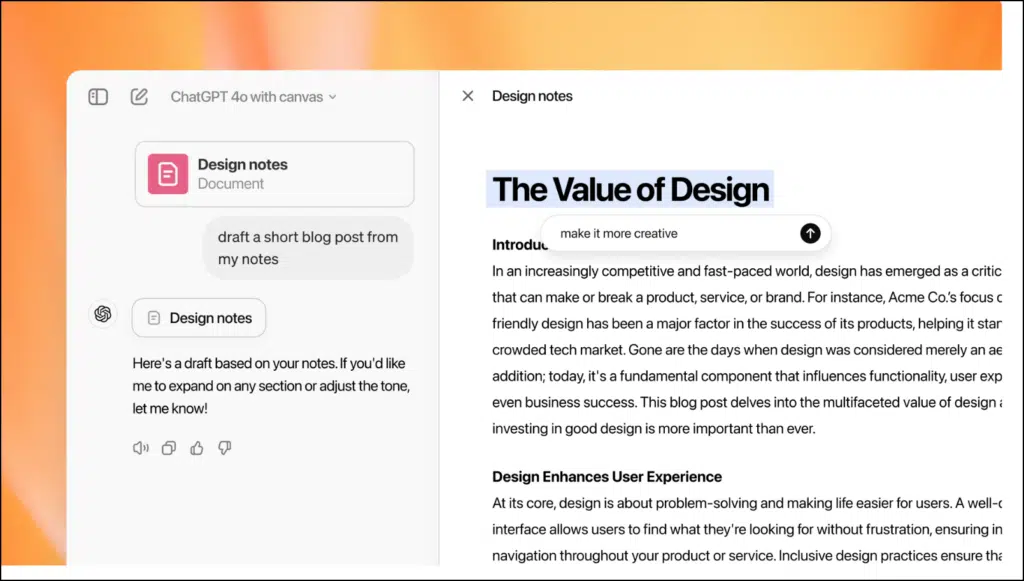
Canvas
Canvas (not to be confused with the LMS) is ChatGPT’s collaborative writing and coding interface. It opens a separate editing window alongside the chat, allowing you to work on a document or piece of code while ChatGPT provides inline suggestions, explanations, or revisions.
For teachers, Canvas is useful for drafting lesson plans, editing worksheets, or building rubrics in a collaborative workflow. Students can use it for writing assignments where they want line-by-line feedback. The feature now supports exporting to PDF, Word, Markdown, and code files, making it practical for turning ChatGPT drafts into polished classroom materials.
Voice Mode
ChatGPT’s voice mode allows real-time spoken conversations with the AI. For classroom use, this opens up possibilities for language practice (students can have conversations in a target language), accessibility support (students who struggle with typing can interact verbally), and hands-free lesson planning during prep time.
Advanced Data Analysis
Originally called Code Interpreter, Advanced Data Analysis lets users upload spreadsheets, CSVs, or datasets, and ChatGPT automatically generates and runs Python code to analyze the data. It produces charts, summaries, and statistical breakdowns without requiring any coding knowledge.
For STEM teachers and researchers, this is a practical tool for demonstrating data analysis concepts. Upload a dataset from a class survey or a public science database, and ChatGPT walks through the analysis step by step. As MIT Sloan EdTech noted, this feature democratizes data analysis for educators and students who lack formal coding training.
Memory and Projects
ChatGPT can now remember details across conversations, such as your grade level, curriculum standards, preferred formatting, and teaching style. Set these preferences once and ChatGPT adapts its future responses accordingly. The Projects feature takes this further by organizing related conversations, instructions, and reference materials into persistent workspaces, so everything related to a specific course or unit stays together.
Web Search
ChatGPT now includes built-in web search, which means it can pull current information rather than relying solely on training data. Science teachers can ask about the latest research findings in a particular field, while social studies teachers can reference recent events without worrying that the AI’s knowledge is outdated.
What the Research Says
The evidence on ChatGPT in education is growing, and the picture is more nuanced than either enthusiasts or skeptics tend to present.
A meta-analysis of 51 studies published in Nature Humanities and Social Sciences Communications found that ChatGPT had a large positive impact on learning performance, a moderately positive impact on learning perception, and a moderately positive impact on fostering higher-order thinking. A separate meta-analysis of 37 studies found an overall effect size of g = 0.577 (moderately positive), with ChatGPT proving more effective in social sciences than other disciplines and showing greater impact with intervention periods of 5 to 10 weeks.
On the student experience side, a survey published in JMIR Formative Research found that 70.2% of students felt ChatGPT helped them save time and 51.2% reported improved understanding of content. But the numbers dropped sharply for deeper learning: only 31% saw benefits for applying knowledge, and just 15.5% felt it helped with long-term knowledge retention.
Meanwhile, Stanford researchers launched a dedicated project to study how ChatGPT is being used in K-12 education, noting a substantial gap in knowledge about AI tool efficacy for supporting learning. Their concern is that AI tools are flooding classrooms with few meaningful evaluations of their actual impact.
Accuracy and Hallucinations: The Numbers Teachers Need
This is the section that matters most for responsible classroom use. ChatGPT hallucinates, meaning it generates information that sounds confident but is factually wrong, and the rates are higher than many educators realize.
A 2024 study published in the Journal of Medical Internet Research tested hallucination rates across models and found GPT-4 produced incorrect information 28.6% of the time, while GPT-3.5 was wrong 39.6% of the time. A separate analysis of mental health citations found that while depression-related citations were 94% accurate, fabrication rates for other conditions like binge eating disorder and body dysmorphic disorder reached approximately 30%.
OpenAI has acknowledged this problem publicly, explaining that hallucinations are a family of failure modes rather than a single measurable property, with rates that vary dramatically based on the task, scoring incentives, and retrieval tools available.
For teachers, the practical takeaway is straightforward: ChatGPT is not a reliable source of factual information. It is a drafting and brainstorming tool that requires human verification. Any classroom use should build in explicit source-checking steps, and students should understand from the start that confident-sounding AI output is not the same as accurate output.
OpenAI’s Education Initiatives
OpenAI has invested heavily in building an education ecosystem around ChatGPT. The OpenAI Academy is a free, publicly accessible learning hub with courses and resources for K-12 educators, including collections on AI literacy, prompt engineering for teachers, and Custom GPT creation.
In partnership with Common Sense Media, OpenAI launched a free one-hour course called “ChatGPT Foundations for K-12 Educators” that covers responsible implementation in classrooms with a focus on student safety and privacy. Common Sense Media’s own data shows that seven in ten students are already using tools like ChatGPT for schoolwork, which underscores the urgency of getting teachers up to speed.
On a larger scale, a 23 million dollar partnership between OpenAI, Microsoft, and teacher unions is funding AI training for more than 400,000 K-12 educators through the National Academy for AI Instruction, offering workshops, online courses, and hands-on training sessions. There is also an official ChatGPT Foundations for Teachers course on Coursera for educators who prefer self-paced learning.
Pricing Breakdown
Here is how ChatGPT’s pricing tiers break down for educators as of early 2026:
Free: Includes file and image uploads, basic web browsing, GPT Store access, and up to 30 chat turns per hour. Enough for exploring the tool, but limited for sustained classroom use.
ChatGPT Plus ($20/month): Five times the usage limits of the free tier, priority access to new features, GPT-5.2 Thinking mode, Advanced Voice, and DALL-E 4. Student discounts are available in the US and Canada.
ChatGPT Team ($25/user/month annual, $30 monthly): Shared workspace, admin console, Custom GPT sharing with team members, and business data excluded from training by default. Could work for department-level adoption.
ChatGPT for Teachers (Free through June 2027): The best current option for individual K-12 educators in the U.S. Includes unlimited messages, web search, file uploads, image generation, memory, data analysis, and Custom GPTs. Requires verification as a K-12 educator.
ChatGPT Edu (Institutional): Pricing starts around $2.50 per user per month for bulk institutional purchases. Enterprise security, admin controls, and no data training. Designed for university-wide deployment.
Privacy and FERPA Compliance
Privacy is the question that comes up in every staff meeting about AI tools, and the answer depends on which version of ChatGPT you are using.
The ChatGPT for Teachers workspace and ChatGPT Edu both include education-grade privacy protections where conversations are not used to train OpenAI’s models. These versions are built to help schools meet FERPA requirements for student data protection.
The free consumer version of ChatGPT does not offer these protections. As legal analysis from JD Supra notes, sharing student names and grades with unauthorized AI tools could constitute a potential FERPA violation. Teachers using the regular free tier should never input identifiable student information.
On age restrictions, ChatGPT is not intended for children under 13, and users ages 13 to 18 require parental consent. In December 2025, OpenAI updated its model specification with teen protections grounded in developmental science, adding safeguards around topics like body image, self-harm, and age-inappropriate content.
Practical Classroom Strategies
Here are approaches that work well for integrating ChatGPT into teaching practice:
Build a course-specific Custom GPT. Upload your syllabus, standards, and preferred resources. Set instructions like “always align responses to the 9th grade biology curriculum” or “suggest hands-on activities whenever possible.” This transforms ChatGPT from a generic chatbot into a curriculum-aware assistant.
Use the “generate then verify” workflow. Have ChatGPT draft a lesson plan, quiz, or set of discussion questions, then spend your time refining and fact-checking rather than creating from scratch. Most teachers find the editing workflow faster than blank-page creation.
Teach students to interrogate AI output. Assign an exercise where students ask ChatGPT a question in their subject area, then fact-check the response against textbook sources or academic databases. When they find errors (and they will), discuss why the AI got it wrong. This builds critical thinking skills that transfer beyond any single tool.
Differentiate with tiered prompts. Ask ChatGPT to explain a concept at three levels: for a student who is struggling with the basics, for a student working at grade level, and for an advanced learner ready for extension. Use the three versions to build differentiated materials for the same lesson.
Use Advanced Data Analysis for STEM projects. Upload a real dataset and let ChatGPT walk students through the analysis, generating visualizations and statistical summaries. Students learn data literacy concepts through actual data rather than textbook examples.
Set explicit boundaries for assignments. If ChatGPT use is permitted, specify what is allowed (brainstorming, outlining, grammar checking) and what is not (drafting full responses, completing take-home assessments). Clear policies reduce ambiguity and academic integrity concerns.
Limitations Teachers Should Understand
Hallucination rates remain significant. Even with the latest models, ChatGPT produces factually incorrect output roughly 25 to 40% of the time depending on the task and domain. This is not a minor caveat; it is a fundamental characteristic of the technology.
Academic integrity is an ongoing challenge. As a Frontiers in Education study notes, ChatGPT-generated text can evade plagiarism checkers, and the quality gap between student and AI writing is difficult to detect. Institutions are responding with AI detection tools and disclosure requirements, but no solution is airtight.
Equity concerns persist. Students with Plus or Pro subscriptions have access to significantly more powerful features than those on the free tier. The ChatGPT for Teachers plan levels this somewhat for educator use, but student access remains uneven.
The free teacher plan is time-limited. The current free access runs through June 2027. OpenAI has stated it intends to keep pricing affordable for educators, but there are no guarantees about what comes after.
Institutional adoption is uneven. Despite enthusiasm, only about 25% of teachers actively utilize ChatGPT in their teaching, with barriers including lack of institutional support, privacy concerns, and uncertainty about best practices. UNESCO reports that fewer than 10% of schools and universities have formal guidance on ChatGPT and AI tools.
Final Thoughts
ChatGPT for education in 2026 is a substantially different product from what launched three years ago. The dedicated teacher tier with free premium features, the university partnerships covering hundreds of thousands of students, and the expanding research base all point to a tool that has earned its place in the education technology conversation.
The key for teachers is approaching it with clear eyes. The research shows genuine benefits for time savings, content creation, and certain types of learning performance, but also reveals limitations around knowledge retention, accuracy, and equitable access. The teachers who get the most value from ChatGPT are the ones who use it as a starting point for their professional judgment, not a replacement for it.
For more on how different AI tools compare for classroom use, see my guides to Perplexity AI for Research, Claude for Education, and Google Gemini for Education.

