Teachers have been using general-purpose AI assistants for lesson planning and resource creation for several years. What makes Claude for Teachers different is that Anthropic has built a version specifically for K–12 educators, with connections to curriculum standards, education-focused workflows, partner teaching platforms, and protections for school data.
In this Claude for Teachers review, I examine how its curriculum connections work, where it may be genuinely helpful, and what educators should consider before uploading classroom information.
What Is Claude for Teachers?
Claude for Teachers is a specialized version of Anthropic’s Claude AI assistant. It is available to individual educators and to schools or districts that want centrally managed accounts.
Eligible educators include classroom teachers, instructional coaches, interventionists, librarians, counsellors, specialists, and other certified staff employed by US K–12 schools or districts.
The current offering includes:
- Premium Claude capabilities
- Teaching Skills for planning and differentiation
- Academic standards from all 50 US states
- Connections to selected curriculum resources
- Education-platform connectors
- Claude Code and Claude Cowork
- K–12-specific terms and data protections
- Higher usage limits than a standard free account
Schools and districts can establish managed workspaces with single sign-on, permissions, roles, and administrative controls.
Claude for Teachers at a Glance
| Area | What is included |
|---|---|
| Intended users | Verified US K–12 educators, schools, and districts |
| Cost | One free year when eligible users register by June 30, 2027 |
| Student accounts | Not included |
| Standards | Academic standards across all 50 US states |
| Curriculum sources | Learning Commons, OpenSciEd, Illustrative Mathematics and partner resources |
| Teaching workflows | Lesson planning, differentiation, assessment and communication |
| Automation | Claude Cowork and scheduled tasks |
| Data training | Teacher conversations are excluded from model training |
| Institutional controls | SSO, roles, permissions and managed district workspaces |
These access conditions were checked in October 2026 and may change.
Curriculum and Standards Connections
The most distinctive part of Claude for Teachers is its connection to Learning Commons. This gives Claude access to academic standards across all 50 states, along with the smaller competencies that sit beneath those standards and the order in which learners typically develop them.
Claude can also draw on selected instructional materials, including OpenSciEd and Illustrative Mathematics.
This matters because a generic AI chatbot only knows what a teacher includes in the prompt or uploads as a file. If the teacher asks for a Grade 7 mathematics lesson without providing the relevant curriculum, the resulting plan may look convincing while missing the required standard, sequence, or instructional approach.
With Claude for Teachers, an educator can begin with a state, grade, subject, and standard. Claude can then draft a lesson using curriculum information connected to that standard.
The output still requires review. Curriculum alignment is more than including the correct code at the top of a lesson plan. Teachers need to check whether the activity actually elicits the intended knowledge or skill, whether the level of challenge is appropriate, and whether the assessment produces useful evidence of learning.
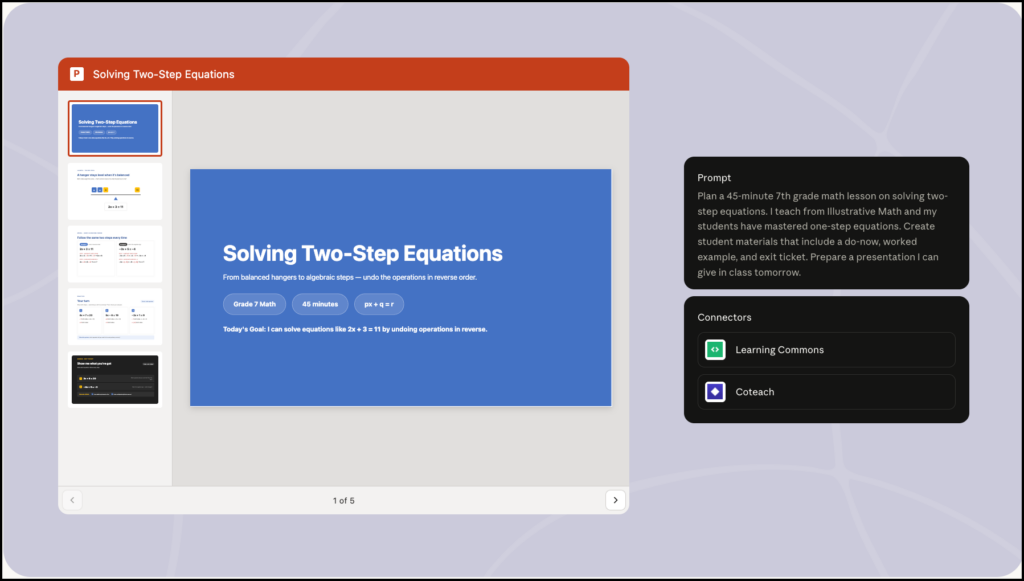
Teaching Skills for Common Tasks
Claude for Teachers includes preconfigured Skills for instructional tasks. A Skill is a reusable set of directions that helps Claude approach a type of work consistently.
The built-in teaching Skills currently emphasize lesson planning and differentiation. Anthropic says these were developed with Learning Commons, evaluated for pedagogical alignment, and revised using teacher feedback.
Teachers can use these Skills to:
- Create a lesson from a curriculum standard
- Adapt an existing lesson
- Generate student-facing materials
- Differentiate resources by readiness level
- Anticipate common misconceptions
- Prepare discussion questions
- Create quizzes and exit tickets
- Draft family communications
Teachers can also create their own Skills. A school might develop one around its lesson-plan format, assessment rubric, report-card expectations, or preferred approach to differentiation.
Custom Skills could reduce repetitive prompting, but the underlying instructions need careful review. If the Skill encodes a weak rubric or an oversimplified differentiation model, it will reproduce those problems across multiple resources.
Differentiating Instruction with Claude
Differentiation is one of the main uses promoted by Anthropic. Teachers can provide Claude with a lesson or text and ask it to prepare resources for learners working below, at, or above a particular level.
For example, Claude might:
- Simplify sentence structure while retaining essential concepts
- Add vocabulary support
- Break instructions into shorter steps
- Generate worked examples
- Prepare an extension activity
- Create different versions of a practice task
The teacher needs to watch for construct substitution. Making a text accessible should help a student engage with the intended learning. It should not remove the very skill being assessed.
If the goal is to evaluate a student’s ability to interpret a complex primary source, replacing it with a simplified summary may change the task. Claude can generate the adaptation, but the teacher must decide whether that adaptation still supports the original outcome.
Working with Files Through Claude Cowork
Claude for Teachers includes Claude Cowork, which allows teachers to work with selected folders and carry out longer, multistep tasks.
A teacher could provide a folder containing lesson materials, de-identified exit tickets, planning notes, or curriculum documents. Claude could then organize the resources, summarize patterns, revise files, or prepare new drafts.
Cowork also supports scheduled tasks. Possible uses include:
- Drafting a weekly family newsletter
- Organizing lesson materials by unit
- Preparing a recurring resource list
- Summarizing de-identified exit tickets
- Revising the following day’s plan from formative evidence
This is more agentic than an ordinary chatbot exchange because Claude can complete sequences of actions and repeat them on a schedule.
That convenience increases the need for clear boundaries. A system may summarize what students wrote, but it cannot independently decide what those responses mean for each learner. Teachers should review the original evidence before changing instruction, grouping students, or making evaluative decisions.
Connections to Other Teaching Platforms
Claude for Teachers connects with several familiar education tools. Anthropic currently lists:
- ASSISTments
- Brisk Teaching
- Canva Education
- Coteach
- Diffit
- Eedi
- MagicSchool
- Snorkl
- TeachFX
These connectors allow Claude to pass work into more specialized environments. A teacher might begin a lesson in Claude, adapt the text through Diffit, turn the material into an activity with Brisk, or move it into a visual format through Canva.
Availability and functionality will vary by platform, account, and institutional settings. Teachers should check whether a connector sends files or classroom information to an additional service before using it with student-related material.
Privacy and Student Data
Anthropic states that conversations and files in verified Claude for Teachers accounts are not used to train its models. The plan also includes FERPA-aligned terms and a K–12 Data Processing Agreement.
Individual teachers can verify using a school email and receive a teacher account. Districts can establish Enterprise organizations with single sign-on and administrative controls.
There is an important difference between the two arrangements. Anthropic explains that using identifiable student records requires authorization from the school or district. A district-managed workspace can provide that institutional arrangement, while an individual teacher should not assume that personal verification authorizes every use of student information.
District administrators may also enable compliance tools that allow authorized administrators to access or delete workspace content.
A cautious practice is to remove student names and unnecessary personal details before uploading material, even when the institution has approved the platform.
Limitations of Claude for Teachers
The largest limitation is availability. Claude for Teachers currently serves verified US K–12 educators. It is not generally available to teachers in Canada or other countries, and the state-standards connection is designed around the American education system.
Other limitations include:
- The offer is temporary, although Anthropic may announce future arrangements.
- Extra usage limits apply.
- Students cannot receive accounts through the plan.
- Curriculum coverage depends on the available connectors and resources.
- Standards alignment still requires professional review.
- AI-generated assessments may contain ambiguity, uneven difficulty, or inaccurate answer keys.
- Automated analysis can flatten differences between students’ reasoning.
- Partner connectors may introduce additional privacy conditions.
Teachers should also remember that Claude can generate inaccurate information. A lesson plan may cite the correct standard and still contain a factual error, inappropriate example, or weak instructional sequence.
Is Claude for Teachers Worth Using?
Claude for Teachers is particularly well suited to US K–12 educators who want AI support grounded in standards and existing curriculum materials. Its teaching Skills, Learning Commons connection, partner integrations, and Cowork workflows give it a clearer instructional structure than an ordinary consumer chatbot.
Its usefulness will depend on how it is used. Generating more materials does not automatically produce better teaching. The stronger use is to begin with a learning outcome, give Claude relevant context, examine what it creates, and revise the resource using knowledge of the students and curriculum.
For teachers who qualify, the free access makes the platform worth exploring. Educators outside the United States can still use standard Claude accounts, but they will not receive the same education-specific terms, standards connection, or teacher workspace.
For a wider comparison, see my guides to Claude for Education and ChatGPT, Gemini, and Claude for teachers.