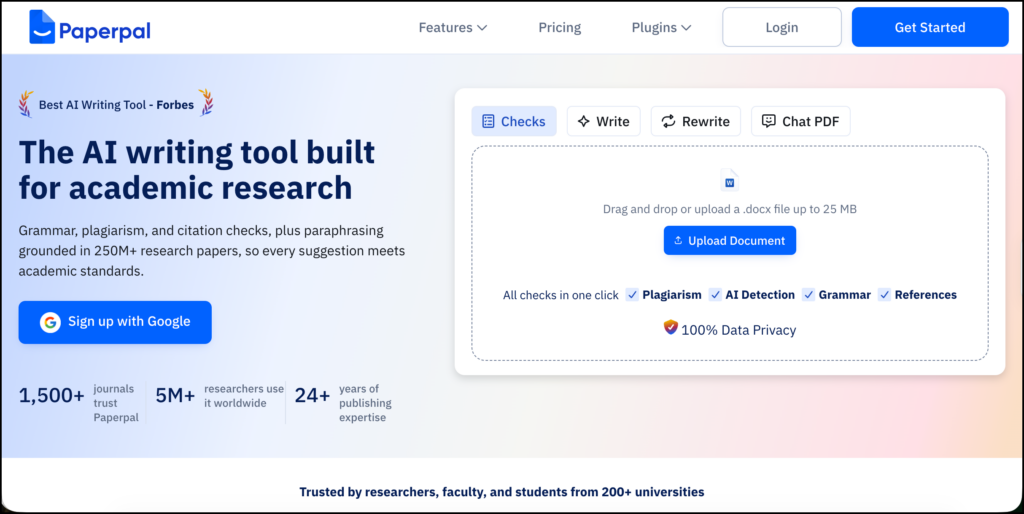
Paperpal is an academic writing and editing platform designed for students, researchers, and scholarly authors. This Paperpal review examines how the tool can support the research-writing process, from exploring literature and developing a first draft to checking references and preparing a manuscript for submission.
Its main strength is academic writing support. Paperpal checks language, suggests revisions, translates scholarly text, searches for research, manages a small citation library, and runs several manuscript-readiness checks.
It is available through its web editor, Microsoft Word add-in, Google Docs add-on, and browser extensions that work with platforms such as Overleaf, Notion, and other online writing environments.
Paperpal is not a full systematic-review platform or a replacement for a reference manager. It fits best during drafting, revision, and pre-submission review, particularly for researchers who want language assistance within the document they are already writing.
Paperpal’s Main Features
Academic Language and Grammar Editing
Paperpal checks spelling, punctuation, sentence structure, vocabulary, and academic tone. Suggestions appear in the document and can be accepted or rejected individually.
The editing system is intended for scholarly writing, so it tries to preserve technical terminology, formulas, abbreviations, and discipline-specific language. It also includes consistency checks for elements such as symbols, p-values, tables, figures, and terminology.
Researchers should still read every revision. A grammatically cleaner sentence can change the level of certainty, obscure who performed an action, or alter the meaning of a technical claim.
Rewrite and Word Reduction
The Rewrite tools can paraphrase, shorten, and adjust the tone of selected text. This can help when meeting an abstract limit, reducing a lengthy discussion, or revising sentences that sound awkward.
Paperpal currently limits each Rewrite request to 500 words. For longer sections, researchers need to work in smaller passages.
Paraphrasing should be used carefully. Rewording a passage does not remove the need to cite its source, and a generated revision may still resemble language found in published work.
Generative Writing Assistance
Paperpal can generate outlines, titles, abstracts, summaries, study highlights, email drafts, and possible continuations of a sentence. Its predictive writing options include expanding an idea, suggesting a counterargument, creating an example, or continuing from the preceding text.
Predicted text is not automatically accompanied by a source. Paperpal’s own documentation advises users to review generated content and locate references for any factual claims.
Research Search and Citation Library
Paperpal’s Research feature has two parts: Search and Citation Library.
Researchers can enter a natural-language question, and the system searches more than 250 million records sourced through R Discovery from Crossref, PubMed, Unpaywall, OpenAlex, preprint servers, and publisher repositories. Paperpal says it identifies up to 100 relevant papers and generates an answer using the top 10 results.
References associated with an answer can be saved to the Citation Library. At present, the library remains fairly basic. Paperpal’s documentation indicates that direct export to a reference manager is not yet available; researchers can copy a DOI and add the item manually to Zotero, EndNote, or another manager.
Chat PDF and Translation
Chat PDF lets researchers question uploaded papers, request summaries, and examine particular sections. It can accept questions in different languages, though Paperpal notes that the feature was developed primarily for English and may sometimes respond in English when another language is used.
The separate translation tool supports more than 50 languages and is designed to preserve technical terms, formulas, and non-English expressions.
Reference and Submission Checks
Paperpal’s Reference Checker parses the manuscript, identifies in-text citations and the reference list, and performs nine checks. These include incomplete metadata, missing DOIs, citation-reference mismatches, possible retractions, questionable journals, broken links, excessive self-citation, and references that may not be verifiable.
The checker can verify metadata for paywalled papers, although verifying that a source actually supports a specific claim may still require access to the full article.
Paperpal also provides a Document Health Check covering language, plagiarism, AI detection, and reference verification. Journal Fit adds more than 30 language and technical compliance checks connected to elements such as disclosures, metadata, and references.
How to Use Paperpal for Research
Paperpal is most useful when placed inside a research process that the author controls. The following workflow uses a realistic example:
How does generative AI feedback influence university students’ revision practices?
1. Start with the Research Question and Evidence Requirements
Write the research question before asking Paperpal to generate anything. Identify the population, central concepts, context, and type of evidence you need.
For this example, the core concepts might include:
- Generative AI feedback
- Academic writing
- Feedback uptake
- Revision decisions
- Higher education
- Student agency
Use Paperpal’s Research search to test different forms of the question and discover terminology used in the literature. The goal at this stage is to improve your search vocabulary.
Paperpal should not be the only search tool for a formal review. Search ERIC, Scopus, Web of Science, PsycINFO, or the databases relevant to your discipline as well.
2. Build a Verified Reference Collection
When Paperpal returns a cited answer, open the references and confirm:
- The paper exists.
- The DOI leads to the correct publication.
- The population matches your question.
- The study reports original evidence rather than commentary.
- The finding is represented accurately.
- The paper has not been retracted or corrected in a way that changes its conclusions.
Save potentially relevant papers to Paperpal’s Citation Library, but maintain the main project library in Zotero, EndNote, or another dedicated reference manager.
A useful habit is to copy each DOI into Zotero as soon as a paper has been verified. This prevents promising sources from becoming trapped inside a temporary search session.
3. Read Individual Papers with Focused Questions
Upload an important paper to Chat PDF and ask specific questions:
- How was student revision measured?
- What type of AI-generated feedback was used?
- Did the study examine actual revisions or student perceptions?
- How long did the intervention last?
- What limitations did the authors report?
- Where in the paper is this finding discussed?
Record the answers in your own evidence matrix. Include page numbers or section locations whenever possible.
Do not place a generated summary into the matrix without checking the relevant passage. Chat PDF may help locate evidence, but the researcher decides what the paper means and whether it belongs in the review.
4. Develop an Argument-Based Outline
Create an outline from the evidence you have read. For the example topic, sections might include:
- Forms of AI-generated writing feedback
- Student uptake and rejection of feedback
- Effects on revision quality
- Learner agency and dependence
- Teacher mediation
- Gaps in current research
Paperpal can suggest alternative structures or identify sections that overlap. Keep control of the intellectual sequence. An automatically generated outline often produces predictable headings without establishing how the sections contribute to the central argument.
5. Draft Before Asking for Language Help
Write the paragraph’s main claim yourself. Add the evidence and explain how it supports, complicates, or challenges the claim.
After the reasoning is in place, use Paperpal for sentence-level work:
- Correct a grammatical error.
- Reduce repetition.
- Shorten a sentence.
- Improve an awkward transition.
- Make a sentence more direct.
- Check whether terminology remains consistent.
This order protects the researcher’s contribution. If the tool generates the claim, evidence interpretation, and prose at the same time, it becomes difficult to determine which ideas genuinely belong to the author.
6. Check Every Generated Revision
Compare the original and revised sentences. Pay particular attention to:
- Causal language
- Levels of certainty
- Negative statements
- Numbers and statistical results
- Population descriptions
- Technical terminology
- Citations
- Claims about significance
For example, “was associated with improved revision quality” should not become “improved revision quality.” The second version turns an association into a causal claim.
Reject suggestions that make the language smoother at the expense of precision.
7. Use Translation as a Two-Step Process
Researchers writing in an additional language can use Paperpal to translate a passage into English and then run a separate academic-language check.
Review technical terms manually and keep the source-language version beside the translation. If the passage reports findings, compare the final English text with the data and original wording.
Translation can improve accessibility, but it does not remove the need for subject knowledge. Small shifts in modal verbs, methodological terms, or degrees of certainty can change the meaning of a research claim.
8. Run Checks at Different Stages
Avoid waiting until the final day to check the entire manuscript.
A practical sequence is:
- After the first full draft: Check grammar, terminology, and structural consistency.
- After major revisions: Run the reference and plagiarism checks.
- Before submission: Use Document Health Check and Journal Fit.
- After the final check: Review the journal’s current author instructions manually.
AI-detection results require particular caution. Detection tools cannot establish authorship with certainty. Treat a flagged passage as a reason to review voice, provenance, and disclosure, not proof that misconduct occurred.
9. Complete a Manual Citation Audit
Paperpal’s Reference Checker can identify useful problems, but conduct a final manual audit:
- Match every in-text citation with the reference list.
- Confirm authors, titles, years, journals, pages, and DOIs.
- Check direct quotations against the source.
- Verify that each citation supports the nearby claim.
- Remove sources you did not read or cannot access sufficiently.
- Check for retractions and corrections.
- Format references according to the target journal.
Metadata accuracy and evidential accuracy are different. A perfectly formatted reference can still be used to support a claim the paper never made.
10. Document and Disclose AI Assistance
Keep a record of which Paperpal functions were used. Journals and universities differ in what they require authors to disclose.
Paperpal recommends consulting the journal’s author guidelines and, where required, describing how the tool was used and confirming that the authors verified its outputs.
Paperpal Pricing
Pricing checked in September 2026:
| Plan | Current price | Main access |
|---|---|---|
| Free | $0 | 200 language suggestions monthly, five AI uses daily, limited submission checks and 7,000 plagiarism-check words monthly |
| Prime | $25 monthly or $144 annually | Higher limits across writing, research, plagiarism, reference, and submission tools |
| Pro | $59 monthly or $348 annually | Higher allowances for intensive academic and clinical writing |
| Institutional | Custom pricing | Centralized access, shared libraries, and organization-level management |
Prime currently includes 10,000 words per month for plagiarism and reference checks. Pro raises these allowances to 30,000 words per month. Subscriptions renew automatically unless cancelled.
Paperpal Compared with Other Research Tools
| Tool | Best suited for | Main limitation |
|---|---|---|
| Paperpal | Academic editing, translation, reference checks, and submission preparation | Research discovery and citation management are secondary features |
| Jenni AI | Source-supported drafting within an AI writing editor | Less focused on detailed submission checks |
| Grammarly | General grammar, clarity, and tone editing | Less specialized for research conventions |
| SciSpace | Reading and questioning research papers | Less focused on sustained manuscript editing |
| Elicit | Literature discovery and structured evidence extraction | Does not provide the same writing and language support |
| Zotero | Reference storage, annotation, and bibliography management | Limited automated language editing |
Privacy, Integrity, and Limitations
Paperpal states that documents, uploads, and personal information are not used to train its AI models. It also states that data is encrypted in transit and at rest and that users can delete uploaded documents.
Researchers should still avoid uploading confidential participant information, identifiable student data, peer-review manuscripts, protected datasets, or embargoed work unless institutional policy permits it.
Paperpal also states that using its generative features does not guarantee that writing will pass plagiarism or AI-detection checks. Generated wording can resemble published language, particularly when the input includes material copied from a source.
The tool is strongest when the research and argument already exist. It can help an author express ideas more clearly and identify technical problems in a manuscript. It cannot judge whether the research question matters, whether the method is defensible, or whether the interpretation is intellectually convincing.
Final Assessment
Paperpal is a practical option for researchers who need sustained academic-language support and want that assistance inside Word, Google Docs, Overleaf, or a web editor. Translation, rewriting, research search, reference checking, and manuscript-readiness tools give it broader coverage than a conventional grammar checker.
Its search and citation features are helpful additions, though they do not replace disciplinary databases or a full reference manager. The best use is selective: the researcher develops the question, reads the literature, interprets the evidence, and writes the argument; Paperpal helps refine and check the document.
Sources
- Paperpal
- Paperpal Pricing
- Paperpal Help Center
- How Paperpal Works
- Paperpal Research Search
- Reference Checker
- Paperpal Translation
- Paperpal Pricing Plans
- Data Security
- AI Disclosure Guidance