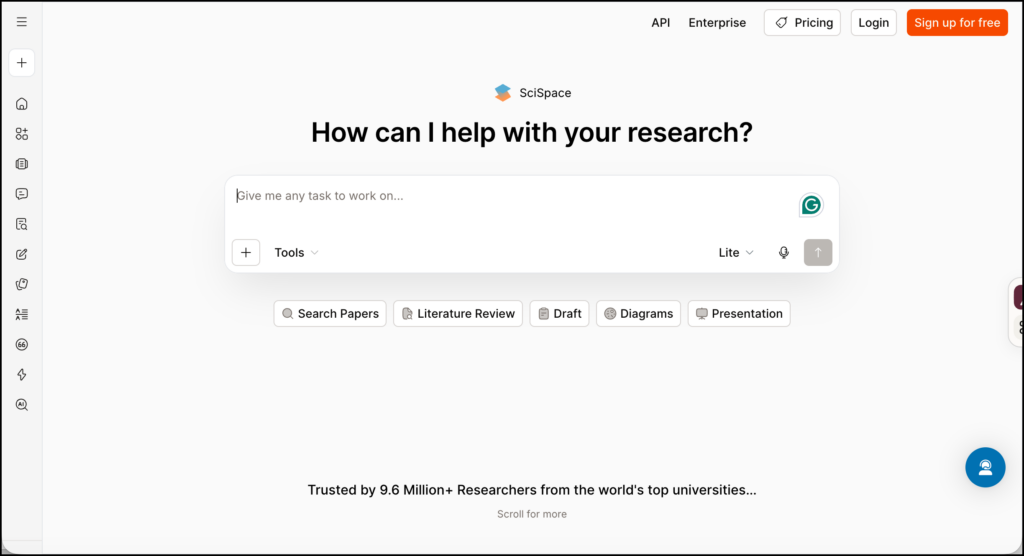
SciSpace is an academic research platform that combines literature search, PDF analysis, data extraction, citation management, and AI-assisted writing in one workspace. This SciSpace review focuses on where these tools can genuinely help researchers and where human checking remains essential.
The platform currently searches a collection of more than 280 million academic papers. Its main tools include Literature Review, Deep Review, Chat with PDF, Extract Data, AI Writer, Citation Generator, AI Detector, a research Agent, and a browser extension.
SciSpace is most useful during literature discovery, paper screening, close reading, and evidence extraction. It can also help with drafting, but this is the stage where researchers need to be particularly careful about attribution, accuracy, and institutional policies on AI-assisted writing.
Main SciSpace Features
Literature search and Deep Review
The Literature Review tool accepts keywords or a research question and returns related papers. Results can be viewed in a table, filtered, compared, and exported in formats such as CSV, XLSX, and BibTeX.
For a more extensive investigation, Deep Review searches across a larger body of literature and produces a structured synthesis. SciSpace describes this as suitable for systematic reviews, although a generated review should not be confused with a complete systematic-review process.
A defensible systematic review still requires a protocol, reproducible database searches, documented screening criteria, transparent exclusion decisions, quality appraisal, and, where required, more than one reviewer.
Chat with PDF
Chat with PDF allows researchers to upload a paper and ask questions about its contents. You can request a summary, ask for an explanation of an unfamiliar concept, locate the authors’ research question, or examine the reported limitations.
SciSpace says this tool can answer questions with references to relevant parts of the document. It can therefore function as a navigation layer over a long paper. The free version is available without a separate Chat PDF subscription, although account and usage limits may still apply.
The safest use is to ask for locations and supporting passages, then read those passages yourself. A confident answer can still leave out a qualification, misread a table, or combine details that appeared in different parts of the paper.
Data extraction and comparison tables
SciSpace’s Extract Data tool can compare papers using up to 50 parameters. Researchers can ask questions in natural language, extract information from specific sections, produce section-by-section summaries, and export results in CSV, Excel, RIS, BIB, or XML formats.
The tool supports more than 75 languages, according to the official product page.
This feature is particularly helpful when a review contains enough papers that ordinary notes become difficult to compare. It can be used to build an evidence matrix covering participants, methodology, interventions, outcomes, findings, and limitations.
SciSpace Agent
SciSpace Agent handles more involved research requests that may combine searching, summarizing, extracting, and drafting. The Agent Gallery also contains task-specific agents and templates for jobs such as literature mapping, creating publication lists, cleaning data, and preparing journal-submission checklists.
Agent tasks consume credits. The amount depends on the complexity of the request, so a long literature review may use considerably more credits than a short paper summary. If the available balance runs out during a task, the workflow pauses until the user upgrades or obtains more credits.
Research library and Zotero connection
Papers can be uploaded to a personal library and organized into folders. SciSpace can also connect to Zotero, allowing researchers to import papers for analysis.
The citation tools support more than 9,000 styles, including APA, MLA, Chicago, Harvard, and IEEE. References can be exported in formats compatible with Zotero, Mendeley, EndNote, and BibTeX-based software. SciSpace itself advises users to check citation metadata and manually correct missing fields.
This is an important limitation to remember. Correct formatting does not guarantee correct metadata. Author names, publication dates, capitalization, page ranges, and DOIs should be verified before a manuscript is submitted.
AI Writer and paraphrasing tools
AI Writer can help develop outlines, draft passages, paraphrase text, and insert references. These functions may be useful when reorganizing notes or working through possible structures.
Researchers should check whether their institution, supervisor, journal, or funder permits this kind of assistance. Any generated passage also needs to be checked for unsupported claims, incorrect citations, and language that overstates the evidence.
The tool should never be used to disguise copied writing or avoid proper attribution. A paraphrased idea still requires a citation when it originated in another source.
Browser extension
The SciSpace browser extension brings paper explanations, summaries, and citation support into the browser. It can be used while reading journal pages and research PDFs, reducing the need to move constantly between separate windows.
AI detection
SciSpace includes a detector that estimates whether text may have been generated by systems such as GPT, Gemini, Claude, or Llama. The company publishes its own performance claims, but these should not be treated as independent validation.
AI detectors produce probabilities and classifications, not proof of authorship. They should not be used as the sole basis for accusing a student or researcher of misconduct. A fair academic-integrity process needs the writing history, drafts, sources, assignment context, and an opportunity for the author to explain their work.
How to Use SciSpace for Research
The most sensible way to use SciSpace is to assign it a limited role at each stage of the research process.
1. Turn the topic into a searchable question
Begin with a focused research question. For example:
How does automated written feedback affect revision quality among undergraduate second-language writers?
Identify the concepts that will guide the search:
- Automated written feedback
- Revision quality
- Undergraduate students
- Second-language writing
- Higher education
This initial work should happen before asking SciSpace to generate a review. Otherwise, the tool has to make too many decisions about the scope of the topic.
2. Run an exploratory literature search
Enter the full question in the Literature Review tool. Examine the suggested papers and record recurring terminology, author names, theories, instruments, and publication venues.
At this stage, you are learning how researchers describe the topic. You might discover that studies use related expressions such as automated writing evaluation, computer-generated feedback, AI-mediated feedback, or automated corrective feedback.
Use these terms to improve subsequent searches. Do not assume that the initial list represents the complete literature.
3. Build a reproducible search strategy
Turn the vocabulary you collected into a Boolean search. A simplified version might look like this:
(“automated writing evaluation” OR “AI feedback” OR “automated corrective feedback”) AND (“second language writing” OR L2 writing) AND (revision OR rewriting)
Record the exact query, search date, filters, and databases. Repeat the search in relevant academic databases such as ERIC, PsycINFO, Scopus, Web of Science, or another source required in your discipline.
SciSpace can broaden discovery, but formal reviews need database coverage that can be documented and justified.
4. Create separate paper collections
Organize papers into folders such as:
- Possible studies
- Included studies
- Excluded after full-text review
- Theoretical and background sources
- Methodological references
This separation prevents an influential theoretical paper from being mistaken for one of the empirical studies included in the evidence synthesis.
Connect Zotero if it is already part of your research workflow. Keep the authoritative citation library there and use SciSpace as the reading and extraction workspace.
5. Screen papers against explicit criteria
Write the inclusion and exclusion criteria before screening the results. For the example above, the criteria might require empirical studies involving undergraduate second-language writers and measuring changes in written revisions.
Use titles and abstracts for initial screening. Retrieve the full text before making the final decision.
SciSpace may help explain why a paper appears relevant, but the researcher must make and document the inclusion decision. For a systematic review, keep an exclusion log with reasons such as wrong population, wrong intervention, non-empirical publication, or unavailable outcome data.
6. Question each paper systematically
Open included PDFs in Chat with PDF and ask the same questions of every study:
- What was the research question?
- Who participated, and how were they recruited?
- What type of feedback was provided?
- How long did the intervention last?
- How was revision quality measured?
- What findings directly address the review question?
- What limitations did the authors identify?
- Where in the paper is each answer supported?
Asking consistent questions makes the resulting notes easier to compare. Follow every answer back to the cited passage, table, or page.
For statistics, request the exact reported value and its location. Then verify it in the original table. This is especially important for sample sizes, effect sizes, confidence intervals, and subgroup findings.
7. Build and verify an evidence matrix
Use Extract Data to create columns such as:
| Evidence field | What to record |
|---|---|
| Study context | Country, institution, course, and delivery mode |
| Participants | Sample size, educational level, and language background |
| Research design | Experimental, quasi-experimental, qualitative, or mixed methods |
| Intervention | Tool, type of feedback, duration, and frequency |
| Comparison | Instructor feedback, peer feedback, control, or previous draft |
| Outcomes | Measures used to evaluate writing or revision |
| Findings | Results that answer the review question |
| Limitations | Weaknesses acknowledged by the authors |
| Evidence location | Page, table, figure, or quoted passage |
| Verification status | Unchecked, partially checked, or confirmed |
The final two columns are worth adding manually. They create a clear path from the extracted claim back to the paper.
Export the table to Excel or CSV and review it outside SciSpace. Look for missing cells, suspiciously uniform summaries, and terms that have been interpreted differently across studies.
8. Move from summaries to synthesis
Group the verified evidence by theme, method, population, or finding. For example, the literature might divide into studies of grammar correction, feedback uptake, revision behaviour, and student perceptions.
Write a short analytic memo for each group:
- What do the studies generally agree on?
- Where do findings conflict?
- Do different methods explain the disagreement?
- Which populations remain underrepresented?
- Which conclusions rely on small or short-term studies?
These memos should be written from the checked evidence matrix. They form a better basis for a literature review than a generated paragraph that blends studies before you have evaluated them.
9. Draft with the sources open
If you use AI Writer, begin with your verified notes and source list. Ask for structural help, such as arranging themes or identifying repetition, instead of asking it to produce an entire literature review from scratch.
Check every claim and citation. Never cite a source you have not opened. If SciSpace attributes a claim to a paper, confirm that the paper actually supports that claim and that the wording preserves the authors’ level of certainty.
Keep a record of AI assistance when disclosure is required by your institution or publication venue.
10. Export, archive, and preserve the audit trail
Export the evidence matrix and citations. Save the original queries, screening criteria, exclusion decisions, checked notes, and final paper list in institutionally managed storage.
Delete uploaded material that no longer needs to remain online. SciSpace states that uploaded PDFs are private and are not used to train its models, for both free and paid users. Even with that assurance, researchers should avoid uploading confidential participant data, unpublished manuscripts belonging to others, identifiable student information, or restricted documents without permission.
SciSpace Pricing
SciSpace uses monthly credits for Agent tasks. Standalone tools outside the Agent do not consume these credits, though separate feature limits may still apply.
As of September 2026, the official credit guide lists the following prices:
| Plan | Monthly Agent credits | Annual-billing rate | Monthly-billing rate |
|---|---|---|---|
| Basic | 100 | Free | Free |
| Premium | 1,200 | $12/month | $20/month |
| Advanced | 10,000 | $70/month | $90/month |
| Max | 40,000 | $160/month | $200/month |
Unused monthly credits expire at the end of the subscription cycle. The plans also differ in how many Agent tasks can run at once: one for Basic, two for Premium, and four for Advanced and Max. Actual credit consumption varies by task.
These prices concern the current research Agent plans. SciSpace also maintains separate publishing and formatting services, so check that you are viewing the correct pricing page before subscribing.
SciSpace Compared with Other Research Tools
| Tool | Best suited to | Distinctive strength | Important limitation |
|---|---|---|---|
| SciSpace | Searching, reading PDFs, extracting data, and drafting | Brings many stages of research into one workspace | Broad feature set and credit system can take time to understand |
| Elicit | Screening studies and building evidence tables | Structured extraction for literature and systematic reviews | Less focused on writing and browser-based reading |
| Consensus | Getting quick answers from research literature | Accessible research summaries and evidence-based responses | Less suited to detailed multi-paper extraction |
| ResearchRabbit | Exploring papers through citation networks | Visual discovery of related authors and publications | Does not provide the same PDF analysis and writing tools |
| Zotero | Citation storage and reference management | Reliable long-term library and word-processor integration | Limited AI-assisted analysis unless extensions are added |
SciSpace makes sense for someone who wants one environment covering discovery, reading, extraction, and writing. Researchers who already have a stable collection of papers may prefer Elicit for structured extraction or Zotero for permanent reference management.
Final Assessment
SciSpace covers more of the research process than most single-purpose academic tools. Its strongest combination is literature search, PDF questioning, and comparative data extraction. These functions can reduce the mechanical work involved in locating passages and organizing repeated information across papers.
The breadth of the platform can also encourage overreliance. A generated Deep Review is not a completed systematic review, a formatted citation may still contain incorrect metadata, and a polished synthesis can hide weak evidence.
I would use SciSpace as a research workspace around the literature: searching, sorting, questioning, and organizing. The final decisions about relevance, study quality, interpretation, and scholarly argument still belong to the researcher.
Sources
- SciSpace official website
- SciSpace Literature Review
- SciSpace pricing
- SciSpace Agent credit and pricing guide
- SciSpace Chat with PDF
- SciSpace Extract Data
- SciSpace literature review guide
- SciSpace Zotero integration
- SciSpace Citation Generator guide
- SciSpace PDF privacy information
- SciSpace browser extension guide