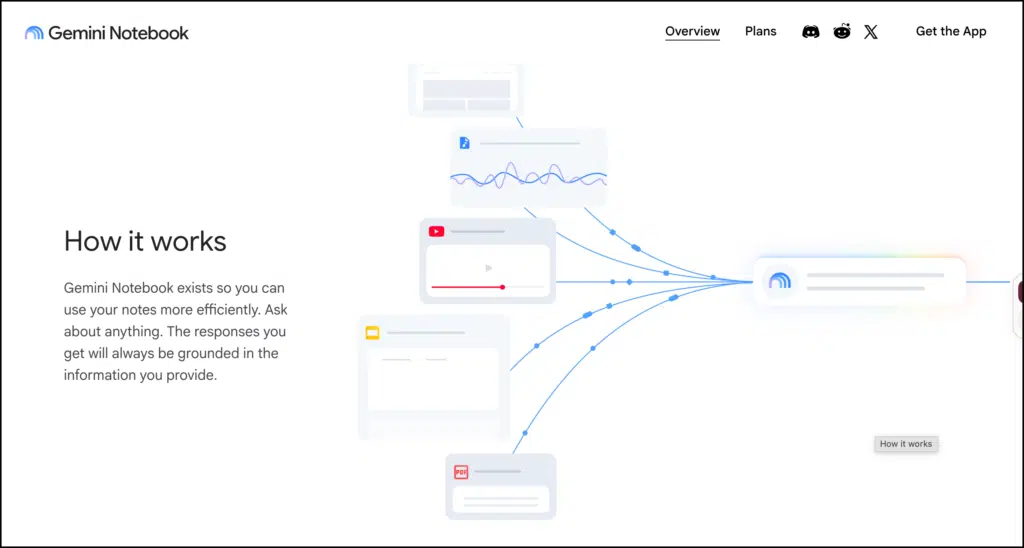
Gemini Notebook, formerly NotebookLM, is Google’s source-grounded research and learning assistant. It lets you collect materials for a project, question them, compare ideas across sources, and turn the material into notes, reports, tables, mind maps, audio discussions, and presentations.
Google renamed NotebookLM to Gemini Notebook in July 2026. The product remains available as a standalone tool, but it now connects more closely with the Gemini ecosystem. Google has also introduced more advanced reasoning and code-assisted analysis for eligible plans.
For researchers, its main advantage is focus. A general chatbot can draw from its wider training and web access. Gemini Notebook works within the collection of sources you assemble. Its answers include inline citations that take you back to the relevant passages, making it easier to check what the system is telling you.
That grounding makes Gemini Notebook useful for organizing a literature review, comparing papers, tracing concepts, preparing research notes, and finding connections across a body of material. It can support these tasks, but the researcher still needs to read the papers, assess their quality, verify the extracted evidence, and develop the interpretation.
What Is Gemini Notebook?
A notebook is a project space containing a selected collection of sources. You might create one notebook for a literature review, another for a research proposal, and a third for a particular theoretical framework.
Gemini Notebook currently accepts PDFs, Google Docs, Google Slides, websites, public YouTube videos, audio files, text, markdown, and pasted content. It can also help users discover additional web sources. Each source can contain up to 500,000 words, while locally uploaded files can be as large as 200 MB. Free accounts can place up to 50 sources in one notebook.
Once the sources are added, the interface is organized around three working areas:
- The Sources panel holds the documents included in the project.
- The Chat panel lets you question all sources or a selected subset.
- The Studio panel generates notes, reports, data tables, mind maps, quizzes, audio and video overviews, infographics, and slide decks.
This structure works well for research because it keeps the source collection, analytical conversation, and generated research materials in one place.
Main Gemini Notebook Features
Source-grounded chat
You can ask questions about one paper, compare several sources, or question the entire collection. Responses include inline citations linked to the supporting passages.
You might ask:
How do these authors define feedback literacy, and where do their definitions differ?
A useful response should identify the definitions and point you back to the relevant passages. Treat those citations as navigation aids. Open each cited passage and check the surrounding argument before using the information in your writing.
Source discovery and Deep Research
The source-discovery feature can locate web materials related to a topic and suggest additions to a notebook. Deep Research supports broader searches and produces research reports with sources that can be imported into the project.
This is helpful during orientation, especially when you are learning the vocabulary of an unfamiliar field. It is less suitable as the sole search method for a systematic or comprehensive review. Database selection, controlled vocabulary, inclusion criteria, and documented search strings still require a deliberate research process.
Reports, notes, and data tables
The Studio can generate briefing documents, study guides, FAQs, custom reports, and data tables. Reports can be exported to Google Docs, while tables can be exported to Google Sheets.
For researchers, the table function is particularly useful. You can ask Gemini Notebook to organize the studies by author, year, context, sample, method, theoretical framework, findings, and limitations. The result gives you a starting structure for an evidence matrix.
The table must be checked against every original paper. A polished row can still contain an incorrect sample size, an oversimplified finding, or information taken from a literature review instead of the study’s own results.
Mind maps
Mind Maps organize topics and relationships as expandable branches. Clicking a node lets you ask follow-up questions about that concept. Google advises users to check the generated content because the map can be inaccurate.
For research, I see mind maps as orientation tools. They can expose recurring themes, related terminology, and possible conceptual groupings. They do not establish that a relationship is theoretically or empirically valid.
Audio and video overviews
Audio Overviews turn selected sources into a discussion between generated hosts. Video Overviews can produce explainer, short, or cinematic formats, depending on access and age eligibility.
These formats are useful when revisiting familiar material or preparing for a meeting. They are risky as substitutes for reading. Google itself warns that Video Overviews may contain factual errors, visual inaccuracies, or audio problems.
Slide decks and infographics
Gemini Notebook can convert sources into a presentation or visual summary. Users can specify the audience, style, length, language, and emphasis. Slide decks can be presented inside the tool or downloaded as PDFs.
Researchers could use this feature to prepare an early lab-meeting presentation or organize a conference outline. Generated slides still need close review. Google notes that they can contain factual and visual inaccuracies, and sources are not consulted when individual slides are revised.
Code-assisted research and analysis
Google’s latest version gives eligible notebooks a secure cloud computer that can write and execute code. This supports more advanced analysis and the production of charts, spreadsheets, and other files. At the time of this review, availability depends on the user’s plan, with access expanding across paid tiers.
This capability may help researchers inspect uploaded datasets, calculate descriptive statistics, clean tables, or create an initial visualization. Any analysis used in research should be reproduced in a transparent environment, checked for coding and statistical errors, and documented independently.
How to Use Gemini Notebook for Research
The strongest way to use Gemini Notebook is as a workspace between searching and writing. It can help you interrogate and organize sources while keeping your judgement at the centre of the process.
1. Create a notebook around one research question
Avoid building a single notebook containing everything you have collected. Give each notebook a defined purpose.
For example:
How does generative AI influence university students’ engagement with feedback?
Create separate notebooks if you later need to examine assessment validity, feedback literacy, or AI-supported writing. A narrower collection produces more relevant retrieval and makes errors easier to spot.
2. Build a controlled source collection
Add the papers you have already selected through databases, citation chaining, or another documented search process. Use source discovery to identify terminology and possible missing materials, then evaluate each suggested source before adding it.
Do not mix peer-reviewed studies, opinion articles, vendor pages, policy documents, and news reports without labelling them. Source type affects the weight you should give a claim.
A simple naming convention can help:
- EMP for empirical studies
- REV for reviews
- CON for conceptual papers
- POL for policy documents
3. Question papers individually before comparing them
Start with one paper at a time. Ask the same extraction questions across your studies:
- What question does the study investigate?
- Who participated, and where was the research conducted?
- What method was used?
- What are the main findings?
- What limitations do the authors acknowledge?
- Which claims come directly from the data?
- What does the paper cite as background but does not test?
Save verified answers as notes. This reduces the risk of allowing the tool to blur findings from different studies.
4. Build and verify an evidence matrix
Once each paper has been examined, request a table with consistent fields. Export it to Google Sheets and add two columns of your own:
- Verified against source
- Researcher interpretation
The first column records whether you checked the entry. The second protects the distinction between what the authors reported and what you think their work means.
This is where Gemini Notebook can save considerable organizational effort without taking over the interpretive work.
5. Compare claims across the collection
After verifying the individual records, move to synthesis questions:
- Which findings appear across multiple studies?
- Where do results conflict?
- Do the studies define the central concept differently?
- Which populations or contexts are missing?
- Are conclusions stronger than the evidence presented?
- Which assumptions are shared across the literature?
Follow every substantial answer back to the cited passages. If several sources are grouped together, inspect them separately before accepting the synthesis.
6. Use adversarial prompts to test your reading
A research assistant should help you question your emerging interpretation. Ask Gemini Notebook to locate evidence that complicates it:
I currently think timely AI feedback increases student agency. Which sources challenge, qualify, or place conditions on that interpretation?
You can also ask it to identify contradictory findings, weakly supported claims, conceptual inconsistencies, and alternative explanations already present in the collection.
This does not replace peer review or theoretical judgement. It helps prevent an early interpretation from becoming the only lens through which you read the material.
7. Draft from your verified notes
Use Gemini Notebook to prepare an outline based on your evidence matrix and saved notes. Write the actual synthesis while consulting the original papers.
A literature review requires decisions about significance, relationships, omissions, and the strength of the evidence. Those decisions belong to the researcher. Generated prose can conceal weak reasoning behind smooth transitions, so drafting directly from verified notes is usually safer.
Gemini Notebook Pricing
Gemini Notebook has a free tier, and paid access is included through Google AI plans. Prices vary by country. At the time of this review, Google lists the following Canadian consumer prices:
| Plan | Canadian price | Selected Gemini Notebook limits |
|---|---|---|
| Free | $0 | 100 notebooks, 50 sources per notebook, 50 chats per day, 3 Audio Overviews per day |
| Google AI Plus | $6.99 CAD/month | 200 notebooks, 100 sources per notebook, 200 chats per day |
| Google AI Pro | $26.99 CAD/month | 500 notebooks, 300 sources per notebook, 500 chats per day |
| Google AI Ultra | From $139.99 CAD/month | Higher limits and access to advanced capabilities |
Google states that these usage limits can change. Researchers should check the official upgrade page and Google AI plans before subscribing.
Gemini Notebook is included without additional charge in all Google Workspace for Education editions. Education accounts receive institutional data protection: Google says the data is not human-reviewed or used to train its models.
Limitations Researchers Should Consider
Gemini Notebook is only as dependable as its sources, retrieval, and generated interpretation. Inline citations make checking easier, but they do not guarantee that a response accurately represents the author’s argument.
Other limitations include:
- It is not a replacement for bibliographic databases.
- Source discovery may not produce a comprehensive or reproducible search.
- Generated tables can flatten methodological and theoretical differences.
- Audio, video, infographics, and slides can introduce inaccuracies.
- Copy-protected PDFs may fail to import.
- Deleted notes cannot currently be recovered.
- Plan limits and premium availability can change.
- Sensitive, confidential, copyrighted, or participant data should not be uploaded without checking institutional requirements and consent arrangements.
Google states that uploaded sources remain private unless the notebook is shared and that the company does not train its models on uploaded data. Researchers should still follow their institution’s data-governance and research-ethics policies.
Is Gemini Notebook Worth Using for Research?
Gemini Notebook is most useful for researchers who already have a collection of sources and need a better way to question, compare, and organize them. Its grounded chat, citations, evidence tables, reports, and source-selection controls give it a clearer research role than a general-purpose chatbot.
Its value depends on the workflow around it. If the researcher checks citations, separates extraction from interpretation, and returns regularly to the original texts, Gemini Notebook can reduce organizational friction and support closer comparison. Used as a shortcut for reading or synthesis, it can produce a tidy account that misses the complexity of the literature.
My recommendation is to use Gemini Notebook as a working research environment: let it help you locate, extract, arrange, and question evidence while you remain responsible for judging what that evidence supports.