A research library can become difficult to manage surprisingly quickly. We collect papers for different projects, download the same article more than once, and leave notes in places we struggle to find later. This EndNote review looks at how the tool helps us organize that material, connect it to our writing, and use its newer AI features with appropriate judgement.
For researchers, the appeal is having a consistent system from the moment a source enters the library to the moment it appears in a manuscript’s reference list.
What is EndNote?
EndNote is a reference-management tool from Clarivate. It helps researchers collect and organize references, attach full-text documents, and create citations and bibliographies. The desktop software supports Windows and Mac, with connected web tools for accessing and synchronizing research materials. It is designed for academic writing and research projects where managing sources becomes an ongoing task.
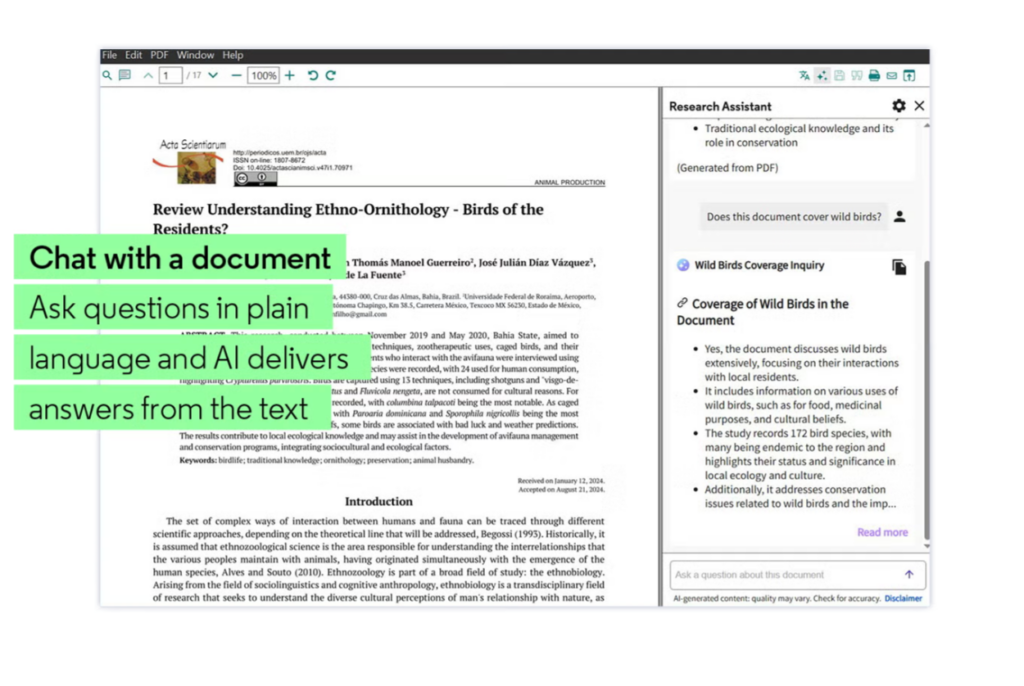
The current version featured on the official website is EndNote 2025. Alongside its reference-management functions, it includes EndNote Research Assistant for working with PDFs through AI-supported summaries, questions, and translation.
EndNote review: Features that support research
Collecting references and full-text papers
EndNote allows you to retrieve references through supported online searches, import records exported from research databases, and create reference records from imported PDFs. You can also attach documents to existing records and use Find Full Text to look for available articles. These options help bring material from different research sources into one library.
I would still check each imported record. Author names, titles, publication dates, and other details need to be correct before they become part of a bibliography. Importing a reference saves typing; reviewing it protects the accuracy of the finished manuscript.
Finding a reference also does not guarantee access to the paper. Full-text availability depends on factors such as open access and the subscriptions available through your institution.
Organizing papers around your projects
EndNote includes groups, smart groups, and tags for organizing a library. You could use these to separate dissertation chapters, teaching resources, methodological readings, and papers for an article in progress.
For researchers working across several topics, I would begin with a small number of clear project groups. The purpose is to make sources easier to retrieve. A complicated system that takes too much effort to maintain can become another research task.
It also helps to decide what your labels mean. A tag such as “read” tells you something different from “use in discussion.” Consistent labels make it easier to return to a collection and understand what you intended to do with it.
Finding duplicate references
EndNote’s Find Duplicates command helps locate repeated records. Its default matching criteria use the reference type together with the author, year, and title fields, and those criteria can be adjusted. This is useful when you import search results from several databases.
I would review the records before removing anything. Two entries may contain different levels of detail or different attachments. For a formal review, keeping a record of your duplicate-removal process also helps you explain how the initial search results became the final set of papers.
Reading and annotating PDFs
EndNote’s PDF tools let you search within a document, highlight passages, underline or strike out text, and add sticky-note comments. This allows you to keep reading notes with the paper itself.
For literature reviews, I would use annotations to record more than interesting quotations. Note the research question, the method, the main finding, and any limitation relevant to your own project. Add a separate comment explaining how the paper connects to your argument.
That distinction matters when writing later: the authors’ claim and your interpretation should remain easy to tell apart.
Creating citations and bibliographies
EndNote’s Cite While You Write supports inserting and formatting references in Microsoft Word and Google Docs. It also provides thousands of citation styles, including common academic and journal-specific formats. This is particularly useful when a manuscript needs to follow a publication’s reference requirements.
EndNote 2025 also includes Cite from PDF, which lets you insert a selected quotation and its corresponding citation into a document. I would still check the quotation, page information, and surrounding context before using it. Convenient insertion does not determine whether a passage supports the claim you are making.
Updating reference information
Find Reference Updates helps retrieve updated bibliographic details, while Find Full Text supports locating available articles. These features can help clean up records that entered the library with incomplete information.
They work best as part of a review routine. Before submitting an article, check that the cited records contain the details required by the chosen style and that the references correspond to the sources discussed in the manuscript.
EndNote’s AI Research Assistant
The official product page describes Research Assistant features for asking questions about a paper, generating key takeaways, summarizing selected text, and translating a full PDF or selected passages. These features are associated with EndNote 2025, so access should be checked against the version you have.
The documentation specifies that an article’s PDF must be attached to its reference record to use Research Assistant. A bibliographic record alone is therefore insufficient for that document-based interaction.
I see practical uses here for getting oriented before a detailed reading or returning to a paper after time away. You might ask about the research question or request a summary of a section, then compare the answer with the original text. Translation may also help you approach literature in another language, though technical terms and quotations need careful checking.
For researchers, the essential habit is to follow the response back to the paper. A readable summary can still omit a qualification that changes the meaning of a finding.
Related: Mendeley Full Review
Discovering related research and journals
EndNote 2025 includes links to Web of Science citing articles and related records. Clarivate specifies that these discovery functions are intended for researchers with a Web of Science subscription. They can help you follow a paper forward to later work or explore related publications.
The Find a Journal feature uses manuscript information to suggest publication matches through supported Cite While You Write integrations. I would use those suggestions to build an initial shortlist, then examine each journal’s scope, recent articles, fees, and submission requirements myself.
Ways researchers can use EndNote
• Maintain a literature-review library. Import search results and organize papers around your research questions.
• Prepare sources for writing. Check reference details, attach available PDFs, and record notes explaining each paper’s relevance.
• Manage references across manuscript revisions. Insert citations as you draft and apply the required bibliography style.
• Support collaborative research. Use EndNote’s sharing options to exchange groups and references with colleagues, checking how sharing works in your desktop and web versions.
• Explore papers with AI support. Use questions and summaries to guide closer reading, then verify the output against the document.
Access, pricing, and practical considerations
EndNote is a paid product with full, upgrade, student, and institutional licensing options. The purchase page lists one-time purchases, while the installation documentation describes a 30-day trial. Check current prices and trial terms before proceeding, as offers and eligibility can change.
I would check your university library first. An institutional licence and local training may affect both the cost and how easily you can get started.
Desktop and web functions also differ. EndNote’s documentation distinguishes the newer EndNote Web from EndNote online and identifies differences in sharing support. If collaboration is central to your work, confirm the workflow your team will use before moving an established library.
My assessment
EndNote is worth considering for researchers who need sustained reference management, publication-specific formatting, and a library connected to their writing workflow. Institutional access makes it particularly relevant for graduate students and research teams already supported by their university.
I would judge it first on those everyday tasks: importing sources, retrieving papers, maintaining accurate records, and citing while writing. Its AI features add useful reading options, but the lasting value comes from building a library you can trust and navigate.