Keeping track of research becomes difficult long before we start writing. Papers accumulate, notes end up in different places, and finding the source behind an idea takes longer than it should. In this Mendeley review, I look at how the tool helps us manage that work, from collecting references and annotating PDFs to inserting citations and using its newer AI features.
What is Mendeley?
Mendeley is a reference manager from Elsevier. It helps researchers, graduate students, and academic writers store, organize, read, and cite their sources. Mendeley Reference Manager is available as a web and desktop application, with desktop downloads for Windows, macOS, and Linux. Free reference manager You can use it to build a research library that brings your references, papers, and reading notes together.
There are three main components to understand. Mendeley Reference Manager holds your library. Mendeley Web Importer helps you collect references while browsing online. Mendeley Cite connects your library to Microsoft Word. Together, these tools support the movement from finding a paper to citing it in your writing.
Mendeley review: Features that matter for researchers
Collecting papers and references
Mendeley lets you import individual PDFs, add entire folders, or drag files into your library. Its Web Importer collects references from the web, while Watched Folders can automatically import PDFs added to a selected desktop folder. These options are useful when your reading comes from several places and you want a consistent way to save it.
I would make checking reference details part of this routine. Look at the author names, publication year, title, and journal information before moving on. A citation manager can format the information it holds, but an incorrect record can still produce an incorrect reference.
Organizing a growing library
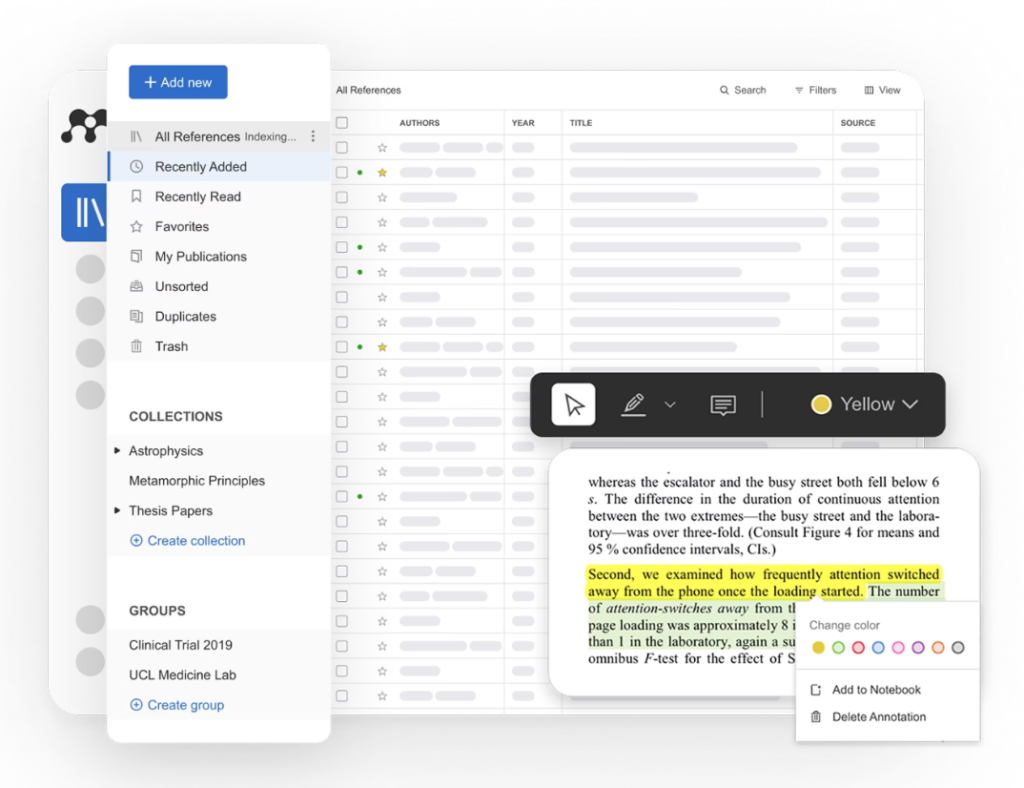
Collections and tags help you organize papers around projects and topics. You might create separate collections for a dissertation chapter, a conference paper, and a course you teach. Smart Collections also provide views such as Recently Added, Recently Read, and Favorites. These give you useful entry points into a library without requiring you to organize every item manually.
Collections work as labels: adding a reference to one does not remove it from All References. Deleting a collection also leaves its references in the main library. That makes it easier to reorganize a project as your questions develop.
My suggestion is to keep the system manageable. A few clear collections and consistent tags will usually be easier to maintain than a complicated structure you stop using after a week.
Related: Zotero Full Review
Reading PDFs and keeping notes
Mendeley includes tools for reading, highlighting, and annotating PDFs. Its Notebook gives you a place to gather thoughts across documents. This is especially useful when you want your reading notes close to the papers that prompted them.
For research purposes, I would distinguish between what a paper reports and what I think about it. A note might first summarize a finding, then record a question about the method or its relevance to my project. That distinction becomes valuable when returning to the source months later.
Highlighting alone rarely gives us enough to write from. Brief notes explaining why a passage matters can make the library much more useful.
Inserting citations in Microsoft Word
Mendeley Cite lets you search your library from a panel in Word, insert individual or multiple references, and generate a bibliography. It supports Microsoft 365, Word 2016 and later, and Word for iPad. The add-in also lets you work without keeping the reference-manager desktop application open.
For researchers who write in Word, this is one of Mendeley’s most practical features. You can insert references as you draft and use your chosen citation style without typing each bibliography entry yourself.
I would still review the final reference list before submission. Automated formatting reduces repetitive work, but checking source details remains part of preparing a manuscript.
Sharing references with colleagues
Mendeley Groups provide shared libraries where collaborators can add references and annotate PDFs. A group could support a co-authored article, a graduate reading group, or a team reviewing literature around a common question.
The useful starting point is a shared purpose. Agree on what belongs in the library and how members should organize their contributions. Otherwise, a shared collection can become just as difficult to navigate as an overflowing personal folder.
Mendeley also automatically syncs library changes to the cloud. This helps you continue working across devices, though I would still maintain separate copies of important research files.
Mendeley’s AI research features
Mendeley now includes Reading Assistant, Compare Experiments, and Ask My Library. These add ways to explore the papers you have saved.
Reading Assistant supports questions about a PDF and provides answers with citations. Compare Experiments can generate a side-by-side comparison table from up to ten PDFs. Ask My Library supports questions across your saved library. Their usefulness depends on the documents available and the accuracy of the responses.
For example, a researcher could ask about a paper’s research question, compare methods across a small set of studies, or look for recurring themes in a collection. I would treat the output as a starting point for closer reading. Follow its citations, check the relevant passages, and confirm that qualifications and limitations have survived the summary.
A comparison table can help organize an initial review. It still needs checking before you use it as evidence in your own analysis.
A few ways researchers can use Mendeley
• Build a literature-review library. Create collections around your research questions and use tags to distinguish theoretical papers, empirical studies, and methodological resources.
• Keep evidence connected to interpretation. Annotate relevant passages and write short notes explaining how they relate to your argument.
• Manage citations while drafting. Use Mendeley Cite to insert sources in Word as you write, then check the bibliography before submission.
• Coordinate collaborative reading. Use a shared group to collect papers for a research team and agree on a simple annotation routine.
• Revisit an established project. Use your collections and notes to recover context, with AI questions as an optional aid for locating material you should reread.
Is Mendeley free?
Mendeley has a free plan with 2 GB of storage and five Reading Assistant questions. Its pricing page also lists Plus, Pro, and Max plans. Plus includes 5 GB of storage and unlimited Reading Assistant access; Pro adds Compare Experiments and Ask My Library with 10 GB of storage; Max includes those features with unlimited storage. These details were checked in September 2026, so review the current plans before subscribing.
For someone starting a research library, I would begin with the free plan. Consider upgrading when you have a clear need for more storage or regularly use the paid AI functions.
My assessment
Mendeley is worth considering if you want to keep papers, notes, and citations within a connected workflow, particularly when you write in Microsoft Word. Its core reference-management features address recurring research tasks, while the AI tools offer additional ways to explore saved literature.
The value comes from using it consistently: save sources as you find them, check their details, organize them around your questions, and leave notes you can understand later. Those habits give you a library you can actually write from.