Elicit is a research assistant designed to help researchers find academic papers, examine the evidence within them, and organize what they discover. Its most useful feature is not simply summarizing articles. It can turn a research question into a structured table in which studies are compared across criteria such as population, methodology, intervention, findings, and limitations.
This makes Elicit particularly useful during the early and middle stages of a literature review. It can help you explore an unfamiliar topic, identify relevant terminology, locate promising studies, screen a large collection of papers, and create an evidence matrix for closer analysis.
Elicit currently searches a collection of more than 138 million papers drawn from Semantic Scholar, PubMed, and OpenAlex. ClinicalTrials.gov can also be selected when searching for clinical trials. Coverage spans multiple disciplines, although researchers should not assume that one search platform contains every relevant publication.
Related: Gemini Notebook Review for Researchers
What Can You Do with Elicit?
Elicit offers several connected research workflows. Which one you choose depends on whether you are exploring a topic, conducting a formal review, or examining papers you have already collected.
Find Relevant Research Papers
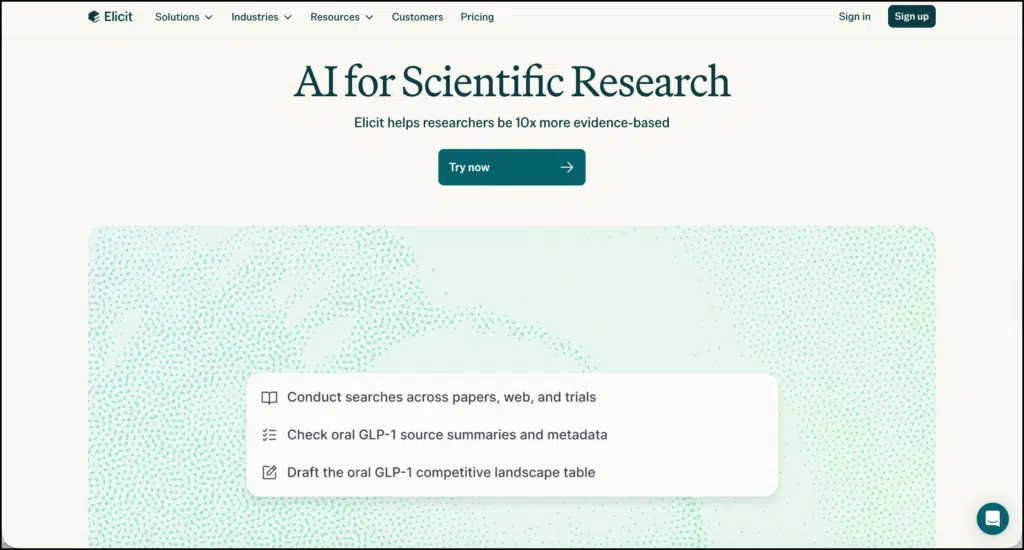
You can enter a research question in ordinary language rather than constructing a complicated search string from the start. Elicit uses semantic search, which means it looks for papers related to the meaning of your question, not only papers containing the exact words you typed.
For example, a researcher could ask:
How does retrieval practice affect vocabulary retention among second-language learners?
The initial table presents ten papers, and additional results can be loaded in batches up to 100. You can filter the results, save relevant papers to your library, and add columns that examine particular aspects of the studies.
Semantic search is especially helpful when you are entering a field whose terminology you do not yet know. The first set of papers can show you the language researchers use, including theoretical concepts, population labels, and alternative names for an intervention.
Create Research Reports
Research Reports provide a more guided way to investigate a question. Elicit searches for relevant evidence, proposes screening criteria, extracts information, and drafts a report supported by references.
Available templates include a general review, a one-page overview, and a research gap analysis. Depending on the subscription, researchers can select different levels of depth. Reports can be downloaded as PDF or Word documents. More importantly, you can inspect the sources and supporting passages behind the report instead of treating the finished text as a self-contained answer.
I would use this feature for orientation rather than for producing a final literature review. A report can help you understand the shape of a topic and identify studies worth reading. It cannot decide whether the search was sufficiently comprehensive or whether the extracted evidence has been interpreted correctly.
Compare Studies in Structured Tables
The table is one of Elicit’s strongest research features. You can add columns for the information you want to extract from each paper. Useful columns might include:
- Research design
- Participant characteristics
- Sample size
- Educational setting
- Intervention
- Outcome measures
- Main findings
- Reported limitations
- Supporting quotation
- Notes requiring verification
This is more useful than collecting a folder full of summaries. A well-designed table makes similarities, methodological differences, and gaps across studies easier to notice.
Elicit can suggest information for these columns, but every important extraction should still be checked against the paper. When a result looks incomplete or surprising, open the supporting passage and examine the surrounding context.
Chat with Selected Papers
The paper chat feature allows you to ask questions across a small group of documents. You might ask what definitions the authors use, where findings agree, or how two studies differ methodologically.
The Basic plan supports chats involving up to four papers, while paid plans support up to eight. This is best suited to close examination of a manageable group of studies. It is not a substitute for synthesizing an entire literature base.
Conduct a Systematic Review
Elicit has a dedicated workflow for systematic literature reviews. Researchers can gather papers, screen titles and abstracts, conduct full-text screening, extract data, and generate a report within the same workspace.
Searches can use either semantic search or Boolean keywords. The distinction matters. Semantic search is useful for discovery, while Boolean searching gives researchers greater control over a reproducible search strategy. Elicit also supports PRISMA-oriented review processes.
The Pro plan can screen as many as 5,000 papers. Larger limits and collaborative features are available on higher plans. Formal systematic reviews still require a protocol, discipline-appropriate databases, documented search strings, independent screening where appropriate, and transparent decisions about inclusion and exclusion.
Import, Organize, and Export Research
Researchers can import papers from Zotero and organize relevant studies in an Elicit library. Depending on the plan and workflow, results can be exported in formats including CSV, Excel, RIS, BIB, PDF, and DOCX. This makes it possible to move references into a citation manager or continue analysing the evidence in a spreadsheet.
Elicit may have full-text access to open-access papers. For other publications, it might only have the title, abstract, and bibliographic information. Its browser extension can sometimes retrieve papers through a researcher’s institutional access.
How to Use Elicit for a Literature Review
The following workflow makes better use of Elicit than asking it for a quick summary and copying the response.
1. Begin with a Focused Research Question
A vague question will usually produce a broad and uneven collection of studies. Define the population, setting, intervention or phenomenon, and outcome wherever these elements apply.
Instead of searching for “technology and student motivation,” try:
How does the use of classroom response systems influence participation among undergraduate students in large lecture courses?
A focused question also helps you decide which papers genuinely belong in the review.
2. Use Semantic Search to Learn the Field
Run the question through Find Papers and examine the first set of results. At this stage, look for recurring terminology, influential authors, measurement instruments, and alternative ways of describing the topic.
Save strong seed papers, but do not assume that the highest-ranked results constitute a complete literature search.
3. Build a Reproducible Keyword Search
Use the terminology found during exploration to construct a Boolean search. Record the exact query, databases searched, date of the search, and filters applied.
For a systematic or scoping review, repeat the search in the specialist databases normally used in your discipline. Elicit can be one documented source within the process, but it should not automatically become the only one.
4. Create an Evidence Matrix
Add columns that reflect your question. For an educational intervention review, I would use:
| Evidence category | What to record |
|---|---|
| Participants | Age, grade level, sample size, and relevant characteristics |
| Context | Country, subject, and learning environment |
| Method | Experimental, qualitative, survey, case study, or mixed methods |
| Intervention | What was implemented and for how long |
| Comparison | Control condition or alternative practice |
| Outcomes | What was measured and how |
| Findings | Results directly related to the research question |
| Limitations | Weaknesses stated by the authors |
| Verification note | Information that needs to be checked manually |
The verification column is particularly valuable. It prevents an automatically extracted statement from quietly becoming part of your final argument before you have confirmed it.
5. Read the Evidence Behind Each Extraction
Open the source passage for every finding that matters to your review. Check whether the statement refers to the whole sample, a subgroup, a secondary outcome, or the authors’ interpretation rather than the measured result.
You should also examine the paper’s methods, not merely the extracted conclusion. A positive result means little without information about sample size, research design, measurement quality, and possible sources of bias.
6. Trace References Beyond the Initial Results
Use promising studies for backward and forward citation searching. Examine their reference lists and find later publications that cite them. This step often identifies relevant work that semantic search missed.
You can also compare the Elicit results with searches in Google Scholar, ERIC, PubMed, Scopus, Web of Science, or another database appropriate to your field.
7. Export and Preserve an Audit Trail
Export the final table and save it with your search notes. Keep a record of excluded studies and the reasons they were removed. Transfer references to Zotero or your preferred citation manager rather than manually recreating them later.
This documentation becomes essential if you update the review, collaborate with another researcher, or need to explain how the evidence was selected.
Elicit Pricing
Elicit has a free Basic plan that includes unlimited paper searching, summaries, source viewing, Zotero imports, and chat with papers for which full text is available. Usage of Research Reports and Research Agent is limited.
At the time of writing, the pricing page displays the following prices when billed annually:
| Plan | Displayed price | Best suited for |
|---|---|---|
| Basic | Free | Topic exploration and occasional searches |
| Plus | $11 per user/month | Deeper individual research and exports |
| Pro | $39 per user/month | Systematic reviews and advanced extraction |
| Scale | $89 per user/month | Research teams and collaborative projects |
| Enterprise | Custom pricing | Institutions requiring greater scale and administrative controls |
The page also displays different prices for some customer categories, so check the current plan selector before subscribing. Pro includes a systematic review workflow capable of screening up to 5,000 papers, while Enterprise raises the screening limit to 40,000.
Strengths and Limitations
Elicit’s main strength is the connection it creates between discovery and structured evidence extraction. It gives researchers a practical workspace for moving from a question to a collection of papers and then to a comparative evidence table.
It also makes its supporting sources easier to inspect than many general-purpose writing assistants. This does not guarantee accuracy, but it gives the researcher something concrete to verify.
Its limitations are equally important. Database coverage may be insufficient for a comprehensive review, extracted details can be incomplete, and access to full text varies across publications. The more formal the review, the less sensible it is to rely on a single platform or accept generated summaries without inspection.
Final Thoughts
I find Elicit most valuable as a research organization and evidence-mapping tool. It can remove much of the clerical work involved in locating studies, setting up comparison tables, and extracting recurring details.
Its output should be treated as a working layer between the search results and your own analysis. The researcher still decides what counts as relevant evidence, checks the original papers, evaluates study quality, and constructs the final synthesis. Used in this way, Elicit can make literature reviews more manageable without turning scholarly judgment over to the software.