Starting a literature search can be difficult when we are still learning the language of a topic. We may have a research question but few useful keywords, or find plenty of papers without knowing how they relate. In this Open Knowledge Maps review, I look at a tool that helps with that early stage by presenting research as a visual overview.
What interests me here is the opportunity to explore a topic before narrowing the search. Seeing related resources grouped together can give us ideas about where to look next and which concepts deserve closer attention.
What is Open Knowledge Maps?
Open Knowledge Maps is an AI-based research-discovery platform operated by a charitable nonprofit organization. It creates interactive maps that group related research resources into topic areas. Its software is open source, and its mission centres on making scientific knowledge more visible and accessible. Researchers, students, teachers, and librarians can use these maps as entry points into unfamiliar topics.
Its main role is discovery. I would use it near the beginning of a project, then take relevant papers into a reference manager and continue searching through appropriate academic databases.
Open Knowledge Maps review: Main features
A visual overview of a research topic
A knowledge map displays topic areas with related resources grouped inside them. The platform uses natural language processing to organize publications according to topic similarity. This gives you a way to explore the structure of the returned results and identify areas relevant to your interests.
For example, someone researching AI in education could examine the map for possible directions, then decide whether to focus on assessment, teaching practice, or another area that appears. The actual groupings will depend on the query and the resources retrieved.
I would treat the first map as an invitation to investigate. Open a promising area, inspect several records, and ask whether the grouping makes sense for your question.
Labels that help you develop search vocabulary
The map’s topic labels can introduce concepts you may not have considered. Open Knowledge Maps identifies learning a field’s terminology as one of the problems its visual interface addresses.This can be helpful when your initial search terms are too broad.
A useful routine would be to keep a short keyword list beside the map. Record unfamiliar terms, check how the papers use them, and decide which belong in your next search. This makes exploration contribute to a more deliberate search strategy.
Broad research coverage
The homepage reports access through BASE to more than 400 million research outputs across over 400 languages. It also describes support for 25 output types, including publications, datasets, software, and images. That coverage gives the platform potential uses beyond finding journal articles alone.
However, the size of the underlying collection does not tell us how completely a particular query represents a field. For a research project, I would still examine which kinds of resources appear and whether they fit the evidence I need.
Identifying open-access resources
Open Knowledge Maps includes both open and closed-access resources and highlights open-access content. Its official description states that many open resources can be read within the interface, with links to full text for others. This helps you move from discovering a title to examining the actual work.
For teachers preparing readings, I would check each document’s availability before sharing it with students. A relevant record is useful, but learners also need a workable route to the text.
Related: EndNote Full Review
How its AI works
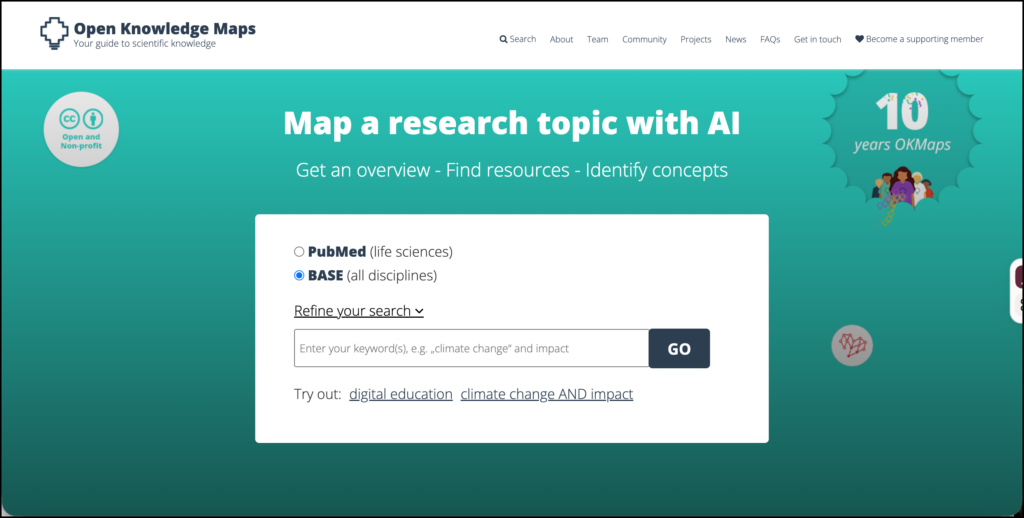
According to the official FAQs, grouping is based on metadata, including titles, abstracts, authors, journals, and subject keywords. Topic labels come from keywords or are inferred from titles and abstracts. The FAQ also explains that maps use the top 100 resources returned by the selected source. These details help establish what the visualization can tell us.
I would therefore read a cluster as an indication of topical similarity. It does not establish that the studies agree, use comparable methods, or provide equally strong evidence. Those judgements require reading the papers.
The same applies to apparent gaps. An area missing from a map may reflect the query, the source coverage, or the selection of results. It is insufficient evidence on its own to claim a research gap.
Ways researchers can use Open Knowledge Maps
• Get oriented before a literature review. Explore an initial topic, note promising areas, and use them to plan more focused searches.
• Develop better keywords. Collect terms from labels and paper records, check their meanings, and test them in academic databases.
• Narrow a broad research interest. Examine several areas and decide which connects most clearly to your research question.
• Find papers for closer reading. Select a manageable set of potentially relevant resources, then assess their methods and findings yourself.
• Compare search formulations. Create maps with different keyword combinations and record how the returned topics change.
• Prepare a research discussion. Bring a map to a meeting as a starting point for deciding what the team should investigate next.
These are suggested workflows, rather than evidence that the tool improves research quality. Their value depends on how carefully we move from the overview to the sources.
Ways teachers can use it
I see a useful role for Open Knowledge Maps in teaching literature-search skills. Students could begin with the same topic, try different keywords, and explain why their searches produced different results. The discussion would focus on search decisions and source selection.
Another activity would be to ask students to select one resource from a cluster, read it, and evaluate whether the label adequately represents its content. They could identify what the map makes visible and what becomes apparent only through reading.
The organization also provides introductory presentations and a scavenger-hunt activity in its training materials. These offer a starting point for instructors or librarians introducing the platform.
Search tips and limitations
The FAQ recommends keyword searches rather than long natural-language questions. It also explains that proximity suggests subject similarity, while a central position does not indicate importance. Metadata quality and missing resources can affect the map.Keep those qualifications in mind when interpreting the visual arrangement.
My suggestion is to begin with a few clear terms, inspect the returned resources, and revise the query. Keep a record of useful terms and relevant papers as you go.
For a systematic review, I would combine this exploratory work with documented searches in suitable databases, explicit inclusion criteria, and a transparent screening process. A map can help you get started, but a visually convincing overview cannot establish completeness.
Access and my assessment
The public search is freely accessible through the website. The nonprofit supports its work through organizational membership, donations, and funding, and offers custom services for institutions that want to integrate its discovery tools. Individual researchers can begin exploring without purchasing a subscription.
Open Knowledge Maps is worth considering when you need help turning a broad interest into a more focused search. Its most useful contribution is the combination of topic groupings, search vocabulary, and routes to research resources.
I would use it to generate directions for inquiry, then judge those directions through reading and further searching. That is where an attractive map becomes useful research work.