


When a platform attracts 5 million teachers across 13,000 schools in over 160 countries, it earns a closer look. MagicSchool AI has grown from a promising startup into one of the most widely adopted AI platforms in education, and with a recent $45 million Series B funding round, the team is clearly building for the long haul.
I have been testing MagicSchool extensively over the past several months, exploring its 80+ teacher tools, its student-facing MagicStudent platform, and its district-level admin features. In this review, I walk you through what MagicSchool does well, where it falls short, and how it compares to the growing landscape of AI tools for teachers in 2026.
What Is MagicSchool AI?
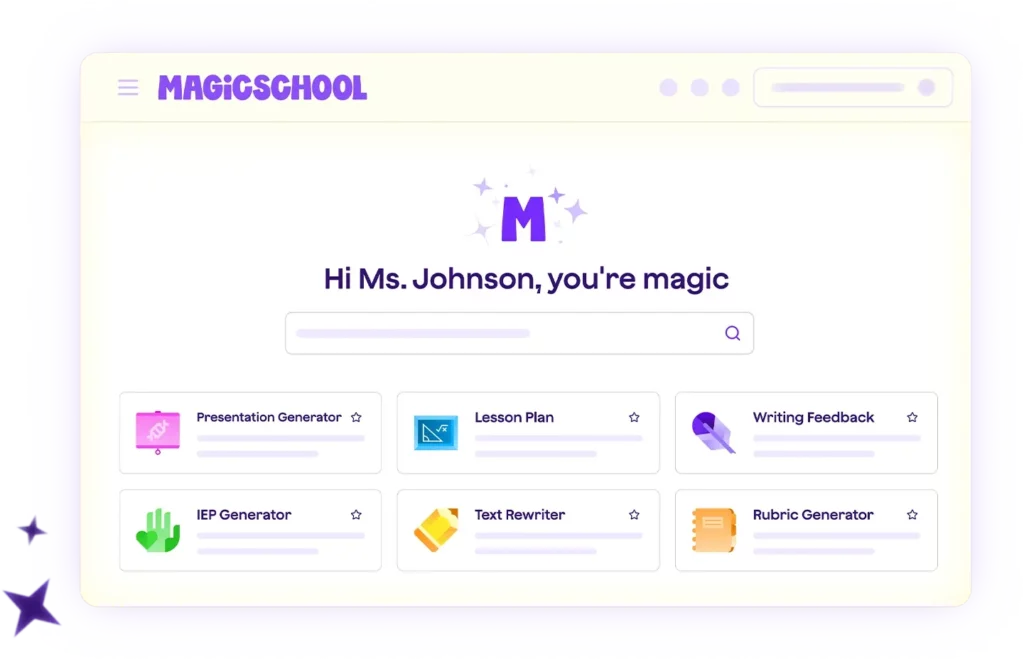
MagicSchool AI is an AI-powered platform built specifically for educators. Founded by a school principal, the platform was designed from the ground up to address the actual day-to-day challenges teachers face: planning lessons, creating assessments, differentiating materials, writing feedback, communicating with parents, and managing the constant flow of administrative tasks that eat into instructional time.
The platform offers 80+ tools organized into clear categories, a dedicated student environment called MagicStudent with 50+ student tools, and enterprise features for schools and districts that need centralized AI management. Everything runs through a clean, intuitive dashboard that requires minimal setup.
MagicSchool AI Tools: What You Get
The strength of MagicSchool is its breadth. Rather than offering one general-purpose chatbot, the platform provides purpose-built tools for specific teaching tasks. Here is how those tools break down by category:
Lesson Planning and Curriculum
The Lesson Plan Generator is one of MagicSchool’s most popular tools, and for good reason. You input your topic, grade level, and standards, and the tool produces a complete, standards-aligned lesson plan in seconds. Recent updates added real-time standards alignment, which means generated content automatically reflects the most current state and national standards rather than relying on outdated databases.
Additional planning tools include a Curriculum Builder for mapping out longer units, a Presentation Generator that exports directly to Google Slides or PowerPoint, and an Academic Content Generator for creating supplementary reading materials.
Assessment and Evaluation
MagicSchool covers the full assessment cycle. The Multiple Choice Quiz Maker creates quizzes aligned to specific standards and Depth of Knowledge levels. The Rubric Generator builds rubrics tailored to any assignment type. The Report Card Comments Generator produces individualized comments, and the Text-Dependent Questions Generator creates questions tied directly to reading passages. For teachers juggling dozens of assessments per week, this cluster of tools alone can reclaim several hours.
Differentiation and Accessibility
This is where MagicSchool really earns its reputation. The Text Leveler rewrites any content at different grade levels while preserving meaning, which is invaluable for mixed-ability classrooms. The Vocabulary Scaffolder creates tiered vocabulary lists with student-friendly definitions. The Make It Relevant tool adapts content to connect with student interests and backgrounds. And the Accommodation Suggestions Generator helps teachers quickly identify appropriate modifications for individual learners.
Special Education and IEPs
Special education teachers will find immediate value here. The IEP Generator helps draft individualized education plans, reducing what typically takes 2-3 hours per student to roughly 30-45 minutes. The Behavior Intervention Plan (BIP) Generator and Accommodation Ideas Generator round out a toolkit that directly addresses one of the most time-intensive areas in education. A word of caution: AI-generated IEP content should always be reviewed carefully for accuracy and potential bias before use.
Content and Material Creation
The Worksheet Generator creates fill-in-the-blank, multiple choice, and open-ended worksheets. The Image Generator, powered by Adobe Firefly, produces classroom-appropriate visuals. The Text Summarizer condenses long readings, and the Text Scaffolder breaks complex texts into manageable chunks with built-in supports. Teachers can export generated content directly to Google Docs, Microsoft Word, or their LMS.
Communication
Parent communication tools include email templates, newsletter generators, and professional communication drafters. These tools handle the tone and structure of school communications while allowing teachers to personalize the content, saving time on a task that often gets pushed to evenings and weekends.
Raina: The AI Teaching Assistant
Raina is MagicSchool’s FERPA-compliant AI teaching assistant, available in Plus and Enterprise plans. Think of Raina as the connective tissue across MagicSchool’s tools. Rather than jumping between individual tools, you can have a conversation with Raina about what you need, and it will guide you to the right tool or generate content directly. Raina supports lesson planning, assessment creation, differentiation, and communication tasks, and it retains context across your conversation so you can refine outputs naturally.
MagicStudent: The Student-Facing Platform
MagicStudent is a separate, student-safe environment with 40+ AI tools designed for learning. Teachers create Student Rooms, which are customizable AI-powered spaces where students can interact with chatbots, study tools, and creative generators. Students access rooms through shared links, Google Classroom, or QR codes.
What makes MagicStudent stand out is the AI Safety Loop, a continuous cycle of Framing (structuring prompts before they reach AI models), Auditing (checking outputs for safety and accuracy), and Refining (updating safeguards as usage patterns evolve). The system blocks harmful or distracting requests, keeps students on task, and provides teachers with real-time visibility into student activity. The platform is SOC 2 certified and FERPA/COPPA compliant, and student data is never stored or used for model training.
Key Updates in 2025-2026
Several updates have made MagicSchool noticeably more powerful over the past year:
- Real-time web search integration: The Research Assistant tool now pulls current, educationally appropriate information from the web, so generated content stays up to date rather than relying on training data alone.
- Math and science graph generation: Teachers can now generate mathematical and scientific visualizations directly in the chat interface, a feature particularly useful for STEM educators.
- Schoology LMS integration: Joining existing Canvas and Google Classroom integrations, Schoology support now enables direct SSO and embedded Student Rooms within course pages.
- Standards alignment updates: Lesson plans and assessments now automatically align with the latest state and national standards in real time.
- $45 million Series B funding: This significant investment signals strong long-term development commitment and investor confidence in the platform’s direction.
Privacy and Data Safety
MagicSchool takes data privacy seriously, and its compliance credentials reflect that. The platform is FERPA, COPPA, GDPR, and SOC 2 certified, and has earned the Common Sense Privacy Seal with a 93% privacy rating, making it one of the top-rated AI tools for schools in terms of data protection.
On the practical side, MagicSchool never sells or trains on personally identifiable information. Student data is deleted immediately after processing, and LLM providers are contractually prohibited from storing or training on any educator or student data. For districts evaluating AI platforms, these protections address some of the biggest barriers to adoption.
Pros and Cons
What Works Well
- Breadth of tools: 80+ purpose-built tools means you rarely need to craft prompts from scratch. Each tool is designed for a specific teaching task, which is far more efficient than using a general chatbot.
- Generous free tier: The free plan gives access to all 80+ tools, making it one of the most accessible AI platforms for teachers who want to experiment before committing.
- Special education support: The IEP and BIP generators address a genuinely underserved need and can dramatically reduce administrative burden for SPED teachers.
- Student-safe environment: MagicStudent provides structured, monitored AI access for students, which is something many competing platforms lack entirely.
- Privacy credentials: FERPA, COPPA, SOC 2, GDPR compliance, plus Common Sense Privacy Seal. Few competitors match this level of verification.
- LMS integrations: Canvas, Schoology, Google Classroom, Clever, and ClassLink support means MagicSchool fits into existing school infrastructure.
Where It Falls Short
- Loading times: Several users report performance issues, particularly during peak usage hours. This can be frustrating when you need quick results.
- Template-driven approach: If you prefer open-ended AI conversations (like working directly in ChatGPT or Claude), MagicSchool’s structured templates can feel limiting.
- Grade-level accuracy: The Text Leveler does not always nail the target grade level. Teachers should review leveled content before distributing it to students.
- Free plan export limitations: No direct export to Google Docs, Microsoft Word, or LMS on the free tier, which adds friction to the workflow.
MagicSchool for Districts
The Enterprise plan adds district-level features that individual teacher accounts cannot provide. Administrators get a usage analytics dashboard with hourly data updates, the ability to create and distribute custom AI tools aligned to district standards, content moderation with real-time alerts for high-risk content, and Student Room Insights for monitoring active sessions across classrooms. Districts can also ground AI responses in their own handbooks, curricula, and policies, ensuring consistent AI behavior across all schools.
Who Should Use MagicSchool AI?
MagicSchool works best for teachers who want structured, ready-to-use AI tools rather than a blank-canvas AI chatbot. If you spend significant time on lesson planning, assessment creation, differentiation, or IEP documentation, the platform’s purpose-built tools will likely save you meaningful hours each week. Teachers who are new to AI will especially appreciate the guided approach, since every tool tells you exactly what inputs it needs and what output you will receive.
Teachers who already use ChatGPT, Claude, or Gemini confidently and prefer the flexibility of open-ended prompting may find MagicSchool’s template structure somewhat restrictive. In that case, MagicSchool still adds value as a specialized toolkit for specific tasks (IEPs, rubrics, leveled texts) alongside your general-purpose AI assistant.
Final Thoughts
MagicSchool AI has earned its position as one of the leading AI platforms for educators. The combination of 80+ purpose-built tools, strong privacy credentials, a dedicated student platform, and meaningful LMS integrations addresses the full spectrum of what teachers need from an AI tool in 2026.
The free tier is generous enough to let you evaluate the platform thoroughly before deciding if the Plus plan’s export and assistant features justify the $8.33-$12.99 monthly cost. What I appreciate most about MagicSchool is that it was built by educators who understood the pain points firsthand. The tools are not generic AI features repurposed for education; they are designed around the specific workflows teachers actually follow. For an in-depth look at other AI platforms for the classroom, check out my guide to the best AI tools for teachers in 2026.

