


An AI teaching assistant can transform how you plan lessons, grade assignments, and engage students. These tools handle the repetitive tasks that eat into your time, freeing you up to focus on what matters most: actual teaching.
Those petty fears that AI will replace teachers or kill creativity?
To me, most of that is pure digital noise.
What bothers me is that after everything we’ve seen, some teachers still choose to ignore the tools right in front of them.
Anyway, let’s focus on what really matters: what AI can actually do in the classroom.
In today’s post, I’m sharing a visual that highlights some of my favorite AI-powered teaching assistants. These are tools I’ve tried, tested, and recommended across countless workshops, consultations, and collaborative projects with educators.
What is An AI Teaching Assistant?
It is an AI-powered platform that helps teachers with a wide variety of tasks such as lesson planning, grading, content creation, student feedback, and classroom management. It also streamlines routine work, offers real-time support, and enhances instruction through automation, personalization, or conversational interaction.
Best AI Teaching Assistants
Here are some of my top recommendations for AI-powered teaching assistants:
- AI Chatbots
Ideal for planning, feedback, explanations, and quick classroom ideation. - Monica
All-in-one AI assistant for writing, coding, and research right in your browser. - Brisk teaching
Chrome tool for instant lesson plans, quizzes, and feedback inside Google Docs. - MagicSchool AI
Teacher-first platform that creates plans, rubrics, and accommodations in seconds. - Twee
Quickly generates EFL lessons, prompts, and discussions with minimal input. - Khanmigo
Khan Academy’s AI assistant for rubrics, hooks, assessments, and student help. - Eduaide
Lesson planning and resource generation tailored to classroom differentiation. - TeacherMatic
Automates admin work: quizzes, lessons, and assessments—so you can teach. - Notion AI
Built into Notion for quick brainstorming, summarizing, and lesson structuring. - Ideogram
Turns text prompts into sharp, classroom-ready visuals. - Diffit
Instantly turns any content into leveled readings, questions, and activities. - Canva
Create slides, worksheets, and visuals fast with built-in AI design tools. - Curipod
Turns any topic into interactive slides with polls, prompts, and visuals. - NotebookLM
Summarizes, explains, and quizzes from your docs—like a custom tutor. - School AI
AI assistant for students, staff, and admins, handles Q&A, scheduling, and more. - Quizizz
Gamified quizzes and interactive lessons that make assessment engaging and fun. - Text Blaze
Create smart text templates to eliminate repetitive typing and automate responses with precision. - TeachMate AI
Teacher-designed assistant that streamlines prep, planning, and feedback. - Snorkl
Grades spoken, handwritten, and drawn student responses. - Almanack
Generates full lesson plans with slides, worksheets, and custom activities in minutes. - Edcafe
Builds student-centered discussion activities to spark collaboration and critical thinking. - Flint AI
Custom AI tutors and assessors that adapt to your learning objectives and materials. - Class Companion
AI tutoring & instant feedback on student work, supports retakes & boosts engagement. - Conker
Create standards-aligned quizzes instantly.
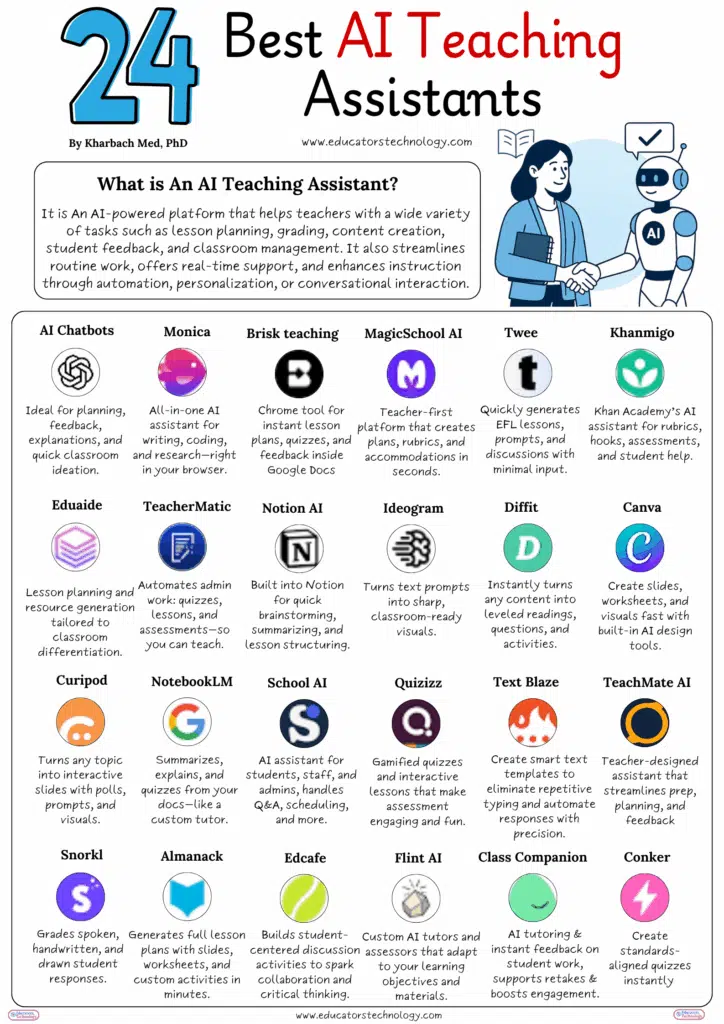
Table of Contents
How to Choose the Right AI Teaching Assistant
With so many options available, selecting the right AI teaching assistant depends on your specific classroom needs. Start by identifying your biggest time drains. If grading consumes your evenings, tools like Snorkl or Class Companion offer robust assessment features. If lesson planning feels overwhelming, MagicSchool AI and Eduaide generate complete lesson structures in minutes.
Consider your subject area too. Language teachers might gravitate toward Twee for its EFL-focused resources, while science educators could benefit from tools that generate lab simulations and visual explanations. Math teachers often find value in platforms like Khanmigo that offer step-by-step problem solving and personalized tutoring capabilities.
Integration with your existing workflow matters just as much. Browser-based tools like Monica and Brisk Teaching work seamlessly within Google Docs and other platforms you already use. Others like Notion AI embed directly into your existing note-taking system. The best AI teaching assistant is one that fits naturally into how you already work rather than requiring a complete overhaul of your processes.
Final Thoughts
The AI teaching assistant landscape keeps expanding, and that’s good news for educators everywhere. These tools aren’t about replacing the human connection that makes teaching meaningful. They’re about removing friction so you can do more of what you do best. Whether you pick one tool or combine several, the goal remains the same: spend less time on administrative tasks and more time inspiring your students.
The key is finding tools that complement your teaching style rather than complicating it.
Start small if you’re new to these tools. Pick one area where you need the most help, try a few options, and see what sticks. Many of these platforms offer free tiers or trial periods, so you can experiment without commitment. Once you find something that works, you might be surprised how quickly it becomes an essential part of your teaching toolkit.

