Powerful AI tools can help us teach, study, and conduct research more efficiently. They can summarize material, explain difficult concepts, generate questions, and organize information. But these tools are only scaffolds. Students and researchers still need to read the original sources, check the evidence, interpret what they find, and do the intellectual work themselves.
That distinction is central to any Gemini Notebook vs ChatGPT comparison. Gemini Notebook is designed to work primarily with a collection of sources that you choose. ChatGPT is a broader AI assistant that can work with uploaded material, search the web, explain concepts, generate content, analyze data, and support open-ended conversations.
Neither is best for every educational task. Gemini Notebook is generally the better option for close work with a defined source collection. ChatGPT is more flexible when the task involves tutoring, content creation, brainstorming, data analysis, or exploring information beyond a fixed set of documents.
NotebookLM Is Now Gemini Notebook
Google renamed NotebookLM Gemini Notebook in July 2026. According to Google, it remains a standalone research product, but notebooks can now connect more closely with the Gemini app and Google Search.
The change is more than cosmetic. Google is gradually integrating notebooks across its services. Sources and notebook instructions can sync among Gemini Notebook, the Gemini app, and notebooks in Google Search’s AI Mode, although the chats themselves do not always sync across these environments.
For educators who have used NotebookLM for some time, the main workflow will still feel familiar: create a notebook, add sources, ask questions, and generate learning materials from those sources.
Gemini Notebook vs ChatGPT at a Glance
| Area | Gemini Notebook | ChatGPT |
|---|---|---|
| Main purpose | Understanding and transforming a selected collection of sources | General-purpose assistance with learning, writing, research, analysis, and creation |
| Source use | Responses in Gemini Notebook chat are grounded in the sources added to the notebook | Can use uploaded files, web search, connected sources, or its general model knowledge |
| Citations | Provides inline citations that lead back to passages in notebook sources | Provides citations when using Search or Deep Research, but ordinary conversations may not include sources |
| Studying | Generates study guides, flashcards, quizzes, mind maps, audio, and video overviews | Study Mode provides guided explanations, questions, and step-by-step tutoring |
| Teaching | Useful for building materials from a course pack or selected resources | Useful for lesson planning, differentiation, examples, rubrics, feedback, and simulations |
| Research | Strong for reading and comparing a defined body of material | Strong for topic exploration, web research, data analysis, drafting, and research planning |
| Multimedia outputs | Audio Overviews, Video Overviews, slide decks, infographics, and other source-based artifacts | Can generate documents, images, presentations, charts, code, and other outputs depending on access |
| Organization | Each notebook is an independent source collection | Projects organize related chats, instructions, and reference files |
| Best suited to | Source-grounded learning and synthesis | Flexible dialogue, creation, tutoring, analysis, and wider research |
For those interested in using Notebook in research, check out my guide: 10 Ways to Use Gemini Notebook for Research
What Gemini Notebook Does Best
Gemini Notebook begins with your sources. You can upload PDFs, documents, spreadsheets, images, audio files, Google Docs, Google Slides, ePub files, copied text, public YouTube videos, and webpages. You can also use eligible Google Play Books as sources.
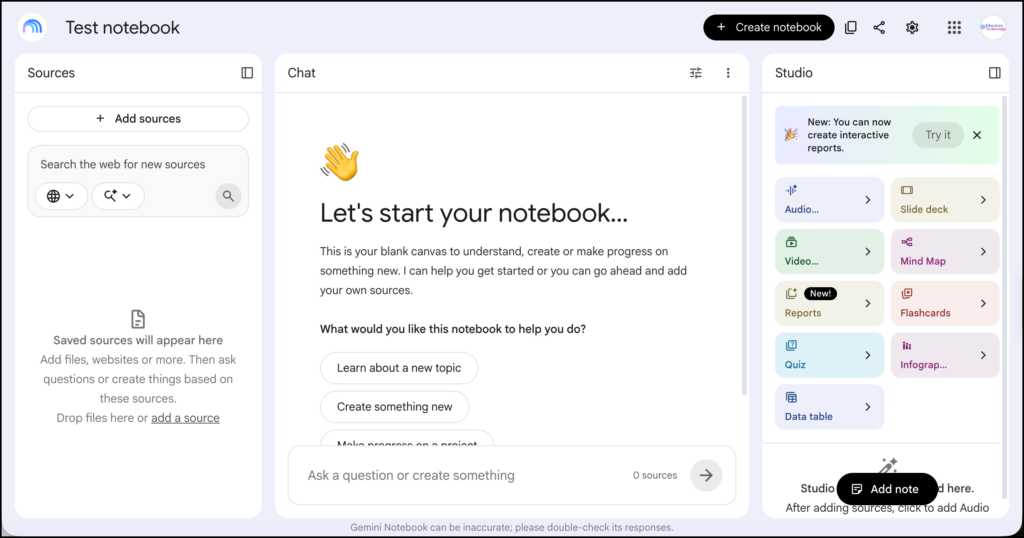
Free users can currently add up to 50 sources to a notebook. According to Google’s source documentation, an individual source can contain up to 500,000 words, while a locally uploaded file can be as large as 200 MB.
Once the sources are in place, you can ask questions about them. Gemini Notebook supports its answers with citations drawn from the uploaded material. Clicking a citation takes you to the relevant location in the source, which makes it easier to check the response in context.
This source-bound design is the platform’s greatest strength. If a teacher creates a notebook containing a syllabus, assigned readings, lecture slides, and assessment instructions, the resulting conversations can remain focused on that course material.
The Studio panel can transform sources into several formats, including:
- Study guides and briefing documents
- Frequently asked questions
- Data tables
- Flashcards and quizzes
- Mind maps
- Audio Overviews
- Video Overviews
- Slide decks
- Infographics
Audio Overviews can be generated as a detailed discussion, a short briefing, a critique, or a debate. Users can also specify a language, adjust the length, and give the system instructions about what to emphasize. Google cautions that these AI-generated recordings may contain inaccuracies or audio glitches.
These outputs make Gemini Notebook particularly useful when the same body of information needs to be approached in several ways. A student might read an article, inspect a mind map of its main concepts, listen to an overview, and then use flashcards to review terminology.
The risk is that these convenient formats can create an illusion of mastery. Listening to an AI discussion about a paper is not the same as reading and interpreting the paper. The overview should prepare or reinforce the reading, not replace it.
What ChatGPT Does Best
ChatGPT is a much broader environment. You can use it to explain a concept, develop a lesson, rehearse an argument, analyze uploaded data, generate an image, revise writing, search for current information, or conduct a more extended research task.
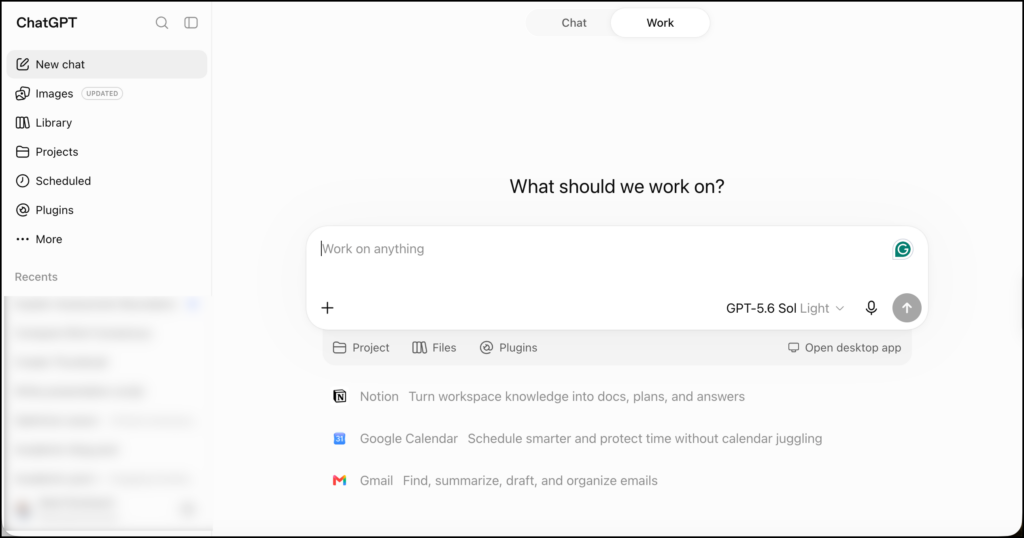
This flexibility is especially useful when the work cannot be contained within a fixed source collection.
A teacher, for example, might ask ChatGPT to:
- Develop several examples of a difficult concept.
- Adapt instructions for different grade levels.
- Create a role-play or classroom scenario.
- Draft a rubric and then revise its criteria.
- Generate sample responses for students to evaluate.
- Suggest questions for a class discussion.
- Analyze an anonymous set of assessment results.
Students can use Study Mode in ChatGPT to work through a topic with more guidance. Instead of immediately supplying an answer, Study Mode can ask what the learner already knows, break a problem into stages, and use questions to support understanding.
This is an important difference. Gemini Notebook is strongest at grounding a conversation in selected material. ChatGPT is stronger at adapting the conversation to the learner as it unfolds.
ChatGPT also has Projects, which bring related chats, reference files, and instructions together in one workspace. A teacher could create a project for a course or unit and ask ChatGPT to follow recurring instructions about grade level, curriculum, tone, and preferred formats.
Projects make ChatGPT more comparable to Gemini Notebook, but the two still behave differently. A Gemini Notebook chat uses the selected notebook sources as its evidence base. A ChatGPT Project provides continuing context for a wider range of tasks.
Which Is Better for Teachers?
Gemini Notebook makes sense when your teaching starts with a defined set of materials.
Imagine that you are preparing a unit around several articles, a curriculum document, and two videos. You could place them in a notebook and ask Gemini Notebook to identify shared concepts, generate questions, create a study guide, or produce an Audio Overview.
This gives the generated material a visible connection to the resources you selected.
ChatGPT is the better fit when you need more freedom to create and revise. You can move from planning a lesson to generating examples, improving instructions, developing an assessment, or simulating a student conversation without having to build a source collection first.
It is also easier to use ChatGPT as a thinking partner. A teacher can explain a classroom problem, challenge the initial suggestions, add constraints, and gradually develop a workable response.
For course-grounded resource creation, Gemini Notebook has the advantage. For the wider range of planning and classroom tasks, ChatGPT is usually more versatile.
Which Is Better for Students?
Gemini Notebook is well suited to studying a specific course or collection of readings. Students can upload permitted materials, ask questions across them, compare ideas, create quizzes, and follow citations back to the relevant passages.
The citations are particularly useful. A student can see where an explanation came from and inspect the original wording instead of accepting a detached AI response.
ChatGPT is the stronger interactive tutor. Study Mode can ask follow-up questions, adjust the level of explanation, provide practice problems, and help a learner work through confusion step by step.
A useful division of labour would be:
- Use Gemini Notebook to study what is contained in the course materials.
- Use ChatGPT to receive adaptive explanations and practise applying what you have learned.
Both can also make studying too passive. Generating a summary, quiz, or set of flashcards is only the beginning. Students need to retrieve information without assistance, explain ideas in their own words, solve problems, and identify gaps in their understanding.
Which Is Better for Research?
For research, the choice depends on where you are in the process.
Gemini Notebook is particularly useful after you have assembled a set of papers, reports, transcripts, or other documents. You can ask it to compare definitions, locate discussions of a concept, identify methodological details, or create a table organized around questions you specify.
Because the chat provides links to supporting passages, it can help with source navigation and preliminary extraction. Still, researchers should check every extracted detail against the original document. A citation can show where the AI found a passage; it does not guarantee that the passage has been interpreted correctly.
ChatGPT is better suited to broader exploration. Its Search and Deep Research capabilities can search beyond an uploaded collection, compare information from multiple websites, and produce a cited report. It can also help refine a research question, examine an argument, analyze data, and develop a writing plan.
The two tools can therefore support different stages of the same project:
- Use ChatGPT to explore a topic, clarify terminology, and identify possible research directions.
- Search academic databases yourself and select the relevant literature.
- Place the chosen papers in Gemini Notebook for close comparison and source-grounded questioning.
- Return to the papers to verify quotations, methods, findings, and interpretations.
- Write the analysis yourself, using AI-generated material only as provisional support.
One caution is essential: neither tool should be trusted to produce a final scholarly literature review autonomously. A literature review depends on defensible searching, selection criteria, critical appraisal, interpretation, and a researcher’s synthesis of the field.
Accuracy, Privacy, and Source Checking
Gemini Notebook’s grounding reduces some forms of fabrication because its chat is designed to answer from the supplied sources. It can still omit important material, misread relationships, or produce an inaccurate synthesis.
ChatGPT can work from sources as well, but ordinary chat responses may combine uploaded information with broader model knowledge. When source control matters, the user needs to specify the allowed evidence and check whether the answer actually follows that restriction.
Privacy also depends on the account and service terms. Google states that content in Gemini Notebook is not used to train its foundational models unless a user chooses to provide feedback. For Workspace and Workspace for Education users, uploads, queries, and responses are not reviewed by human reviewers or used to train AI models. Details are available in Google’s Gemini Notebook privacy documentation.
Schools and universities should still follow their approved platforms, data-governance policies, and consent requirements. Personally identifiable student information, confidential research data, unpublished participant data, and restricted course materials should not be uploaded casually to either platform.
NotebookLM vs ChatGPT: Which Should You Choose?
Choose Gemini Notebook if you want to:
- Study or teach from a defined collection of sources.
- Trace answers back to specific passages.
- Compare several documents within the same notebook.
- Turn course materials into study guides, quizzes, audio, video, slides, or infographics.
- Keep the AI conversation closely grounded in material you selected.
Choose ChatGPT if you want to:
- Develop lessons and educational materials through conversation.
- Receive adaptive tutoring through Study Mode.
- Brainstorm, write, revise, analyze data, or generate different media.
- Search beyond a fixed source collection.
- Conduct wider web-based research with citations.
- Maintain an ongoing teaching or research workspace through Projects.
For many educators and researchers, the most sensible answer is to use both selectively. Gemini Notebook is my preferred type of tool for working closely with a controlled source collection. ChatGPT is more useful when I need an adaptable assistant for planning, explanation, creation, analysis, and open-ended research.
The real question is not which platform has more features. It is how much control you need over the information being used. Start with the task, choose the appropriate tool, and keep the reading, interpretation, and final judgment in human hands.