If you’ve ever spent a Sunday afternoon building worksheets from scratch, formatting questions, writing answer keys, and adjusting everything for three different reading levels, you already know how much time material creation eats up. It’s one of the most repetitive parts of teaching, and it’s exactly the kind of task where AI can make a real difference.
AI worksheet generators have become a go-to tool for a growing number of teachers. The idea is straightforward: you give the AI your topic, grade level, and the type of questions you want, and it produces a draft worksheet you can edit, print, or share digitally.
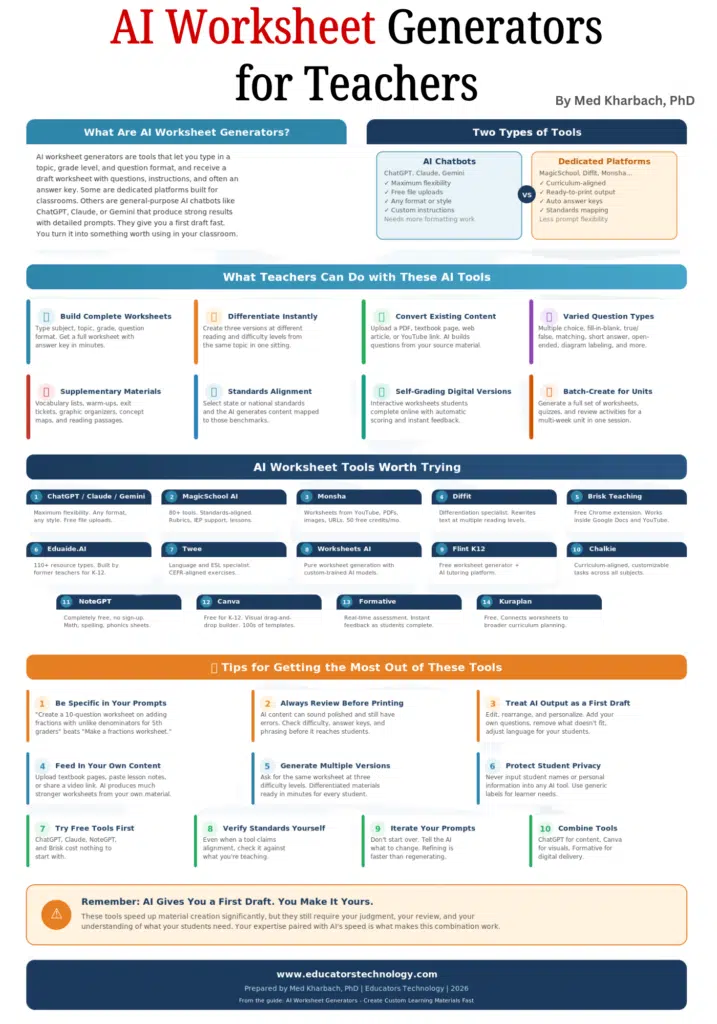
Some tools are built specifically for this purpose, with curriculum alignment and answer key generation built in. Others are general-purpose chatbots like ChatGPT, Claude, or Gemini that you can prompt with detailed instructions to get surprisingly good results.
I want to be upfront about something. These tools are not perfect. They speed things up significantly, but they still require your judgment, your review, and your understanding of what your students need. AI gives you a strong first draft. You turn it into something worth using in your classroom. And that combination, your expertise paired with AI’s speed, is what makes these tools genuinely useful.
In this guide, I’ll walk through what these tools can do, share a curated list of the ones teachers actually use and talk about, and close with practical tips to help you get the most out of them.
Please note that I am not affiliated with any tool, framework, or platform mentioned here and its inclusion in this guide does not necessarily mean endorsement!
What Teachers Can Do with These AI Tools
The range of what AI worksheet generators can produce has grown well beyond simple question-and-answer sheets. Here’s a look at what’s possible.
- Build complete worksheets from a single prompt: You type in the subject, the topic, the grade level, and the question format you want, and the AI returns a full worksheet with questions, instructions, and often an answer key. The whole process takes a few minutes.
- Create differentiated versions of the same material: This is one of the most valuable features. You can take one topic and ask the AI to produce three versions at different reading and difficulty levels. What used to take an entire prep period now happens in one sitting.
- Convert existing content into worksheets: Many tools accept uploads. You can feed in a PDF, a textbook page, a web article, or even a YouTube video link, and the AI generates questions and activities based on that source. It’s a fast way to turn a reading you already use into a structured learning activity.
- Generate a wide variety of question types: Multiple choice, fill-in-the-blank, true/false, matching, short answer, open-ended prompts, diagram labeling, compare/contrast. You pick the mix, and the AI delivers.
- Produce supplementary materials alongside worksheets: Vocabulary lists, warm-up activities, exit tickets, reading comprehension passages, graphic organizers, concept maps. These tools handle the supporting materials that round out a lesson.
- Align materials to curriculum standards: Several dedicated platforms let you select state or national standards, and the AI generates content mapped to those benchmarks. It’s not foolproof (you still need to verify), but it gives you a head start.
- Create self-grading digital versions: Some platforms produce interactive worksheets that students complete online. The tool scores responses automatically and gives students instant feedback, which frees you from hand-grading routine assignments.
- Batch-create materials for an entire unit: You can generate a full set of worksheets, quizzes, and review activities for a multi-week unit in one session, then refine each piece as the unit progresses.
AI Worksheet Tools Worth Trying
There’s no shortage of AI tools that can help with worksheet creation, but they fall into two broad categories: general-purpose chatbots you shape with good prompts, and dedicated platforms built specifically for the classroom.
1. AI Chatbots (ChatGPT, Claude, Gemini)
I always recommend starting here. ChatGPT, Claude, and Gemini can all generate solid worksheets if you give them detailed instructions. Paste in your topic, specify the grade level, describe the question types you want, and ask for an answer key. The flexibility is the biggest advantage.
You control the format, the tone, the difficulty, everything. Free versions now support file uploads, so you can feed in your own documents and have the AI build questions from your source material. The trade-off is that the output needs more formatting work than what dedicated tools produce.
2. MagicSchool AI
MagicSchool AI is one of the most widely adopted AI platforms in K-12 education. It offers 80+ tools including a worksheet generator that aligns to state and district standards. It produces fill-in-the-blank, multiple choice, and open-ended questions on any topic. It also handles rubric generation, lesson planning, and IEP support, so it pulls triple duty.
3. Monsha
Monsha has become a teacher favorite because worksheets connect to broader lesson plans. Materials don’t exist in isolation. A notable feature: it generates worksheets from YouTube videos, PDFs, images, and web articles. Free plan gives you 50 credits per month.
4. Diffit
Diffit specializes in differentiation. It takes any text, article, or web content and rewrites it at multiple reading levels (grade 2 through grade 11+), then generates comprehension questions for each level. If you have a mixed-ability classroom, this tool is worth your time.
5. Brisk Teaching
Brisk Teaching is a free Chrome extension that works inside Google Docs, Slides, and YouTube. You don’t leave your existing workflow. Highlight text in a Google Doc and generate questions, or pull a YouTube video into a worksheet activity without switching platforms.
6. Eduaide.AI
Eduaide.AI was built by former teachers and offers 110+ resource types: worksheets, graphic organizers, educational games, lesson plans, rubrics. It’s designed specifically for K-12 use, and teachers appreciate the breadth of what it covers.
7. Twee
Twee is aimed at language teachers and ESL instruction. It creates exercises aligned to CEFR levels covering reading, writing, speaking, and listening. If you teach language courses, this is the most targeted tool on the list.
8. Worksheets AI
Worksheets AI focuses purely on worksheet generation with custom-trained AI. You input your requirements and get printable, editable worksheets tailored to your specific student population.
9. Flint K12
Flint K12 offers a free AI worksheet generator that produces multiple choice, short answer, and long-form questions aligned to curriculum standards. It also functions as a broader AI tutoring platform.
10. Chalkie
Chalkie generates curriculum-aligned worksheets with customizable tasks, formats, and difficulty levels. Straightforward and works across subjects.
11. NoteGPT
NoteGPT is completely free with no sign-up required. It creates printable worksheets for math, spelling, phonics, and other subjects. No hidden costs, no subscriptions.
12. Canva
Canva is free for K-12 educators and offers a drag-and-drop worksheet builder with hundreds of pre-made templates. It’s less AI-powered than others on this list, but it’s the best option when you want visually polished materials.
13. Formative
Formative is a real-time assessment platform where AI features add instant feedback as students complete worksheets digitally. It’s ideal for in-class formative check-ins where you want students to course-correct in the moment.
Tips for Getting the Most Out of These Tools
Here are some practical tips to help you get the most out of these AI worksheet generators:
| Be specific in your prompts. “Make a worksheet about fractions” gives you something generic. “Create a 10-question worksheet on adding fractions with unlike denominators for 5th graders, including 3 word problems and an answer key” gives you something you can actually use. Detail matters. |
| Always review before printing. AI-generated content can sound polished and still contain errors. Questions might not match the difficulty level, answer keys might have mistakes, and phrasing can sometimes confuse students. Read through everything before it reaches your classroom. |
| Treat AI output as a first draft. The best results come from teachers who edit, rearrange, and personalize what the AI gives them. Add your own questions, remove ones that don’t fit, adjust the language for your particular students. The AI handles the bulk creation. You handle the quality control. |
| Feed in your own content. Upload your textbook pages, paste your lesson notes, or share a video link. AI tools produce much stronger worksheets when they’re working from your specific source material. |
| Generate multiple versions for differentiation. Ask the AI for the same worksheet at three difficulty levels. You’ll have differentiated materials ready in minutes, and every student gets content at the right level for them. |
| Never input student names or personal information. When using any AI tool, keep student identifiers out of your prompts. Use generic labels if you need to reference specific learner needs. |
| Try the free tools first. Most dedicated platforms offer free tiers that are generous enough to test properly. ChatGPT, Claude, NoteGPT, and Brisk cost nothing to start with. Don’t pay for a subscription until you’ve confirmed the tool fits your workflow. |
| Verify standards alignment yourself. Even when a tool claims to align to curriculum standards, check it against what you’re actually teaching. AI sometimes maps content loosely or references standards that don’t quite match. |
| Iterate your prompts. If the first output isn’t right, don’t start over. Tell the AI what needs to change: “Make question 3 harder,” “Add a diagram labeling section,” “Rewrite the instructions for a lower reading level.” Refining is faster than regenerating from scratch. |
| Combine tools for best results. Some teachers use ChatGPT to draft the content, then paste it into Canva for visual formatting, or use Diffit for differentiation and Formative for digital delivery. No single tool does everything perfectly, but two or three together can cover your whole workflow. |
Conclusion
AI worksheet generators won’t replace the thought you put into your lessons, and they shouldn’t. But they can take one of the most time-consuming parts of teaching and compress it dramatically. The tools are available, most of them are free, and the learning curve is short.
Start with one tool and one assignment type. See how it fits your workflow. Edit what the AI gives you until it meets your standards. And give yourself permission to experiment. You’ll find your rhythm quickly, and the hours you save on material creation can go right back into the parts of teaching that need you most