


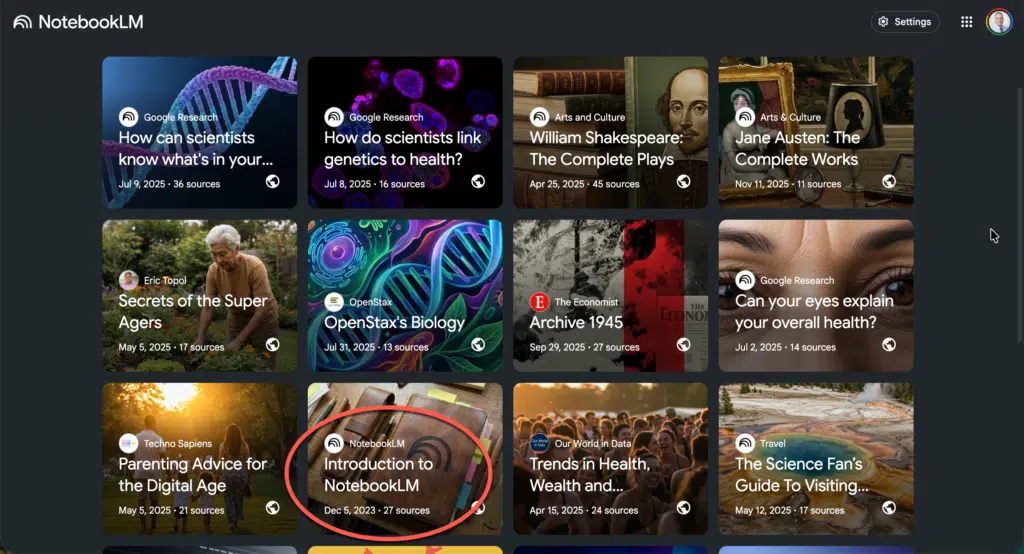
Google’s NotebookLM recently rolled out an update that many users might overlook, but it’s one worth paying attention to if you work with information, research, or teaching materials. The platform now displays featured notebooks directly inside the interface, offering curated examples designed to help users understand topics by exploring real sources.
This might sound like a small addition, but for teachers, it opens up practical possibilities for both learning the tool and rethinking how we organize information for ourselves and our students.
What Are Featured Notebooks?
Featured notebooks are pre-built collections that Google has curated to demonstrate how NotebookLM works in practice. One example is a notebook called “Introduction to NotebookLM,” which walks users through everything needed to get started. Inside, you’ll find written explanations, guides, and video resources all organized within the notebook structure.
What sets this apart from typical documentation is the interactive element. You can engage with featured notebooks the same way you would with your own. Ask questions, probe ideas, and observe how NotebookLM reasons over the provided materials. You’re not reading about the tool from the outside. You’re learning by working inside a live example.
Why This Matters for Teachers
Teachers juggle enormous amounts of information daily: curriculum documents, research articles, student resources, professional development materials, and administrative guidelines. NotebookLM offers a way to bring sources together and interact with them through AI-assisted inquiry. Featured notebooks lower the barrier to understanding how this actually works.
Learning by doing, not just reading. Most software tutorials ask you to read instructions and then apply them separately. Featured notebooks flip this approach. You learn the tool while using it, which mirrors how many educators prefer to acquire new skills. Instead of watching a video and hoping you remember the steps later, you’re inside the environment, testing features in real time.
Seeing structure in action. One challenge with any new tool is understanding how to organize materials effectively. Featured notebooks show you how sources can be arranged, how questions can be framed, and how the AI draws connections across documents. For teachers who want to build their own notebooks for lesson planning, research projects, or professional learning, these examples serve as practical templates.
Low-stakes experimentation. Trying a new tool with your own important materials can feel risky. What if you set it up wrong? What if you waste time? Featured notebooks remove that pressure. You can experiment, ask unusual questions, and explore without worrying about messing up your own work. Once you understand the patterns, transferring those skills to your own notebooks becomes much easier.
Related: NotebookLM guide for teachers
Practical Applications for Educators
Once you’ve explored the featured notebooks and feel comfortable with the interface, the applications for teaching and professional work expand quickly.
You could build a notebook around a unit’s primary sources, allowing students to query historical documents or scientific articles directly. You might create a notebook for a professional learning community, gathering research on a specific pedagogical approach and using the AI to synthesize findings across multiple studies. Curriculum coordinators could assemble policy documents, standards, and instructional guides into a single notebook that answers questions about alignment and implementation.
The featured notebooks demonstrate these possibilities without requiring you to build from scratch first. You see what’s possible, then adapt the approach to your own context.
A Different Kind of Tutorial
What makes featured notebooks genuinely useful is that they feel less like documentation and more like apprenticeship. Traditional tutorials tell you what buttons to click. Featured notebooks show you how thinking happens inside the tool. You watch the AI work with real sources, and you participate in that process.
For educators who value inquiry-based learning, this approach will feel familiar. It’s the same principle we apply in classrooms when we give students authentic problems to work through rather than abstract exercises. Google has essentially applied that pedagogy to its own product training.
Related: 10 Unexpected Ways to Use NotebookLM with Your Students
Getting Started
If you haven’t explored the featured notebooks yet, they’re worth your time. Open one and treat it as a learning space rather than something to skim. Ask questions you’re genuinely curious about. Test the boundaries of what the AI can do with the provided sources. Pay attention to how the notebook is structured and what kinds of sources are included.
Whether you’re new to NotebookLM or already use it regularly, featured notebooks offer a window into effective practices. For new users, they provide a guided entry point. For experienced users, they offer ideas for structuring sources and inquiries that you might not have considered.

