AI tools for teachers now cover almost every area of instructional work, from lesson planning and differentiation to assessment, feedback, research, and classroom content creation. The difficulty is no longer finding an AI tool. It is deciding which tools are genuinely useful.
I have tested and reviewed a wide range of educational AI tools, and this guide brings together the ones I believe offer the most practical value for teachers. I am not affiliated with the tools included here. My recommendations are based on their educational usefulness, ease of use, available features, and the quality of the content they produce.
You can browse the recommendations below or download the free PDF version of the guide for future reference.
AI tools and their pricing change frequently. Always check the provider’s website for current features, account requirements, age restrictions, and privacy policies before using a tool with students.
Best AI Tools for Teachers at a Glance
| AI tool | Best for | Free option |
|---|---|---|
| ChatGPT | Planning, brainstorming, and content creation | Yes |
| Claude | Working with documents and improving written materials | Yes |
| Gemini | Google Workspace tasks and general teaching support | Yes |
| MagicSchool | Teacher-focused generators and administrative tasks | Yes |
| Brisk Teaching | Creating and adapting content in the browser | Yes |
| Diffit | Differentiating texts and instructional materials | Yes |
| Curipod | Interactive lessons and student participation | Yes |
| SchoolAI | Guided and monitored student AI activities | Yes |
| NotebookLM | Source-based research and study materials | Yes |
| Canva for Education | Presentations, worksheets, images, and videos | Yes for eligible educators |
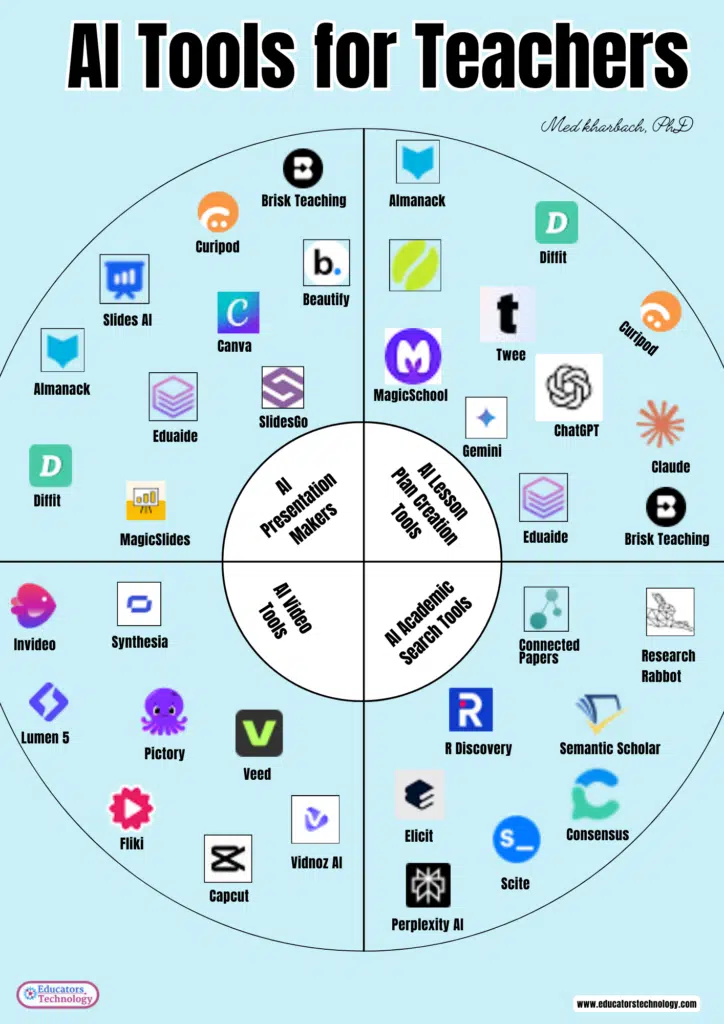
How Teachers Can Use AI Tools
Generative AI tools such as ChatGPT, Claude, and Gemini can act as instructional assistants. They can help teachers develop an initial lesson outline, generate examples, adapt reading materials, create discussion questions, and explore different ways of presenting a concept.
Education-focused platforms such as MagicSchool, Brisk Teaching, Diffit, Curipod, and SchoolAI provide more structured tools designed around common classroom tasks.
Teachers can use AI to:
- Draft lesson and unit plans
- Generate classroom activities
- Create quizzes, rubrics, and exit tickets
- Adapt texts for different reading levels
- Develop examples and explanations
- Brainstorm project ideas
- Prepare discussion and debate questions
- Draft parent communications
- Create presentation slides and visual materials
- Provide an initial layer of feedback on student work
Students can also use AI to brainstorm research questions, compare explanations, practice problem-solving, receive feedback on early drafts, and examine a topic from different perspectives. These activities need clear instructions and appropriate teacher oversight, especially when students are asked to enter information into an external platform.
Recommended AI Tools for Teachers
1. ChatGPT
ChatGPT is a versatile general-purpose AI assistant. Teachers can use it to brainstorm lessons, generate questions, create examples, adapt explanations, and draft classroom materials.
Its flexibility is one of its greatest strengths, but it also means that the quality of the result depends heavily on the instructions provided. Teachers should include the grade level, subject, learning objective, available time, student needs, and desired format in their prompts.
2. Claude
Claude is particularly useful when working with long documents or developing substantial written materials. Teachers can use it to summarize documents, compare ideas, revise instructions, develop unit outlines, and examine the organization of a text.
It can also help identify gaps or ambiguities in a draft. As with other generative AI systems, its interpretations and factual claims still need to be checked against the original sources.
3. Gemini
Gemini is worth exploring if your school already uses Google products. Teachers can use it for brainstorming, planning, summarizing, drafting, and creating instructional content.
The exact features available will depend on your Google account and the Workspace plan used by your institution. School administrators should review the education-specific privacy and account controls before enabling student access.
4. MagicSchool
MagicSchool brings together a large collection of teacher-focused AI generators. Its tools can help create lesson plans, rubrics, assessments, report card comments, worksheets, discussion questions, accommodations, and family communications.
MagicSchool is useful for teachers who prefer selecting a clearly defined task rather than developing every request from scratch in a general chatbot.
5. Brisk Teaching
Brisk Teaching works through the browser and helps teachers create or adapt content while viewing webpages, documents, and other online materials.
Depending on the available plan and integration, teachers can use Brisk to change a text’s reading level, create instructional materials, generate feedback, develop quizzes, or turn an existing resource into a classroom activity.
Its browser-based workflow is convenient because teachers do not always have to copy material into a separate AI platform.
6. Diffit
Diffit is designed to help teachers adapt instructional content for different learners. It can generate or modify reading passages, vocabulary activities, comprehension questions, summaries, and other resources.
This makes it especially helpful when a class is working on the same topic but students need different levels of linguistic or reading support. Teachers should still review the adapted text to ensure that important meaning and disciplinary vocabulary have not been lost.
7. Curipod
Curipod helps teachers create interactive lessons containing activities such as polls, questions, drawings, and written responses.
It is particularly useful when you want students to participate throughout a lesson instead of simply viewing a presentation. AI can provide an initial lesson structure, but the teacher should adjust its pacing, examples, and questions to fit the class.
8. SchoolAI
SchoolAI allows teachers to create guided AI learning experiences for students. Rather than sending students directly to an unrestricted chatbot, teachers can establish a particular topic, purpose, and set of instructions for the activity.
Potential applications include historical conversations, revision practice, guided inquiry, language learning, and formative assessment. Teachers should examine the platform’s monitoring, privacy, and student-access settings before using it.
9. NotebookLM
NotebookLM is a source-based research and learning tool. You add selected materials to a notebook and then use those sources to generate summaries, questions, comparisons, study aids, and other forms of analysis.
For teachers, it can be useful for examining curriculum documents, preparing lessons from a collection of readings, or creating study materials grounded in assigned sources. Students can use it to interrogate a carefully selected source collection, but they still need to compare its responses with the original material.
10. Canva for Education
Canva for Education combines visual-design tools with AI-supported content creation. Teachers and students can use it to produce presentations, posters, worksheets, infographics, videos, and other multimedia resources.
Canva is especially useful when the final product needs to communicate information visually. AI-generated designs, images, and text should nevertheless be reviewed for factual accuracy, accessibility, and appropriate representation.
Choosing the Right AI Tool
A tool should solve a real instructional problem. Before creating another account or paying for an upgrade, consider the following questions:
- What specific task will the tool help me complete?
- Does it perform that task better than the tools I already use?
- Can I edit and export what it generates?
- Does it require students to create accounts?
- What information does it collect?
- Is it appropriate for the students’ ages?
- Does it comply with my school’s privacy requirements?
- Can students with different learning needs access the resulting material?
- How much teacher review will the output require?
- Does the free plan provide enough functionality for regular use?
A smaller collection of carefully selected tools is usually more useful than dozens of platforms performing essentially the same task.
Tips for Getting Better Results from AI
The way you communicate with an AI tool has a significant effect on the response you receive. A useful prompt normally includes:
- The role or perspective you want the AI to adopt
- The grade level and subject
- The learning objective
- Relevant student needs
- The material or topic being taught
- The desired response format
- Any limits, criteria, or standards it should follow
For example, instead of asking:
Create a lesson about ecosystems.
You could write:
Create a 45-minute Grade 6 lesson introducing food chains and food webs. Include a five-minute opening activity, a teacher explanation, a collaborative task, two formative-assessment questions, and an exit ticket. Use examples familiar to students in Atlantic Canada.
The second prompt gives the AI enough context to produce a more relevant starting point.
For a more detailed discussion of prompting, see my book, ChatGPT for Teachers: Mastering the Skill of Crafting Effective Prompts.
What Teachers Should Check Before Using AI
AI-generated content can sound polished and authoritative even when it contains errors. Anything produced by AI should be treated as a draft that requires professional judgment.
Before using AI-generated material, check:
- Factual claims and statistics
- Citations and references
- Curriculum and standards alignment
- Reading level and vocabulary
- Cultural representation and possible bias
- Accessibility for students with different needs
- The suitability of examples for the age group
- Copyright and licensing restrictions
- Student privacy and data-protection requirements
Teachers should also avoid entering confidential student information into general-purpose AI systems. This includes student names, assessment records, medical information, individualized education plans, and other identifying details unless the platform has been formally approved for that purpose.
AI Should Support Rather Than Replace Teacher Judgment
Concerns about AI in education are legitimate. They include data privacy, academic dishonesty, bias, misinformation, student dependence, and the possible erosion of creativity and critical thinking.
The answer is not to accept every new AI product uncritically. Nor is it helpful to assume that avoiding AI will make these questions disappear. Students are already encountering generative AI, and educators have an important role in helping them understand its capabilities and limitations.
Used thoughtfully, AI can reduce some of the routine work surrounding teaching and create more time for decisions that require human knowledge of students. It can generate possibilities, but the teacher still determines what is accurate, worthwhile, appropriate, and educationally meaningful.
Download the Free AI Tools for Teachers Guide
I created a downloadable version of this guide for teachers who would like to keep the recommendations in one place.
Download the free AI Tools for Teachers PDF
You are welcome to download the guide and use it in your own instructional planning. Please contact me before reproducing it, publishing excerpts, distributing it in workshops, or using it in another publication.
Final Thoughts
There are now more educational AI tools than any teacher could reasonably test or use. The goal of this guide is not to encourage you to adopt all of them. It is to help you identify a small number of tools that can address genuine needs in your teaching.
Start with one task that consumes a disproportionate amount of your time. Choose a suitable tool, test its output, and decide whether it meaningfully improves your workflow. Most importantly, continue to edit, verify, and question what the technology produces.
AI can assist with planning, differentiation, assessment, research, and content creation. The professional and ethical decisions surrounding those tasks, however, remain ours.