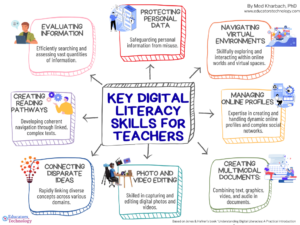
Digital skills are part of everyday teaching. Teachers use technology to prepare lessons, find resources, communicate with families, assess student work, and support different learning needs. With AI now entering many of these activities, deciding how and when to use a tool has become an essential part of the work.
Being digitally skilled involves more than knowing which buttons to press. It includes judging whether a resource is credible, making a document accessible, protecting student information, and recognizing when technology adds unnecessary complexity. A useful tool should help you accomplish something that matters in your classroom.
The skills below offer a starting point for reflecting on your practice. You do not need to master everything at once. Identify an area that would make a difference to your teaching, practice it in a manageable context, and build from there.
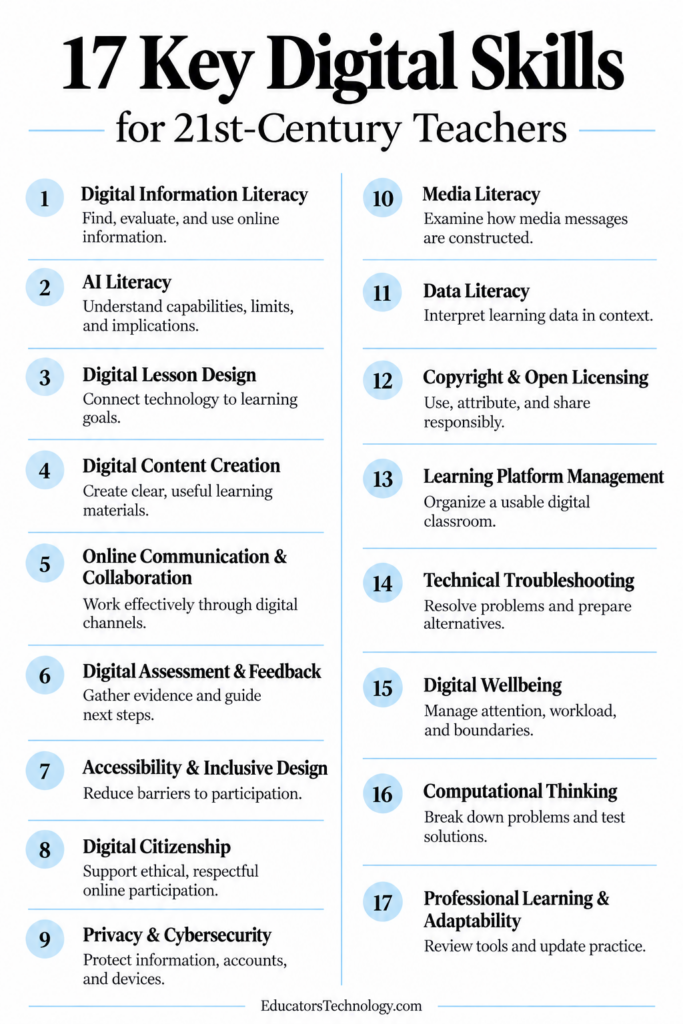
| Digital skill | What it involves |
|---|---|
| Digital information literacy | Finding, evaluating, and using online information |
| AI literacy | Understanding AI and making informed decisions about its use |
| Digital lesson design | Connecting technology choices to learning goals |
| Digital content creation | Producing clear, useful learning materials |
| Online communication and collaboration | Working effectively through digital channels |
| Digital assessment and feedback | Gathering evidence of learning and responding to it |
| Accessibility and inclusive design | Reducing barriers in digital learning |
| Digital citizenship | Supporting ethical and respectful participation online |
| Privacy and cybersecurity | Protecting information, accounts, and devices |
| Media literacy | Examining how media messages are constructed |
| Data literacy | Interpreting data with appropriate caution |
| Copyright and open licensing | Using and sharing materials appropriately |
| Learning platform management | Organizing a usable digital classroom |
| Technical troubleshooting | Resolving common problems and preparing alternatives |
| Digital wellbeing | Managing attention, workload, and boundaries |
| Computational thinking | Breaking problems into steps and testing solutions |
| Professional learning and adaptability | Reviewing tools and updating practice thoughtfully |
1. Digital Information Literacy
Teachers need to find useful information and judge whether it deserves a place in a lesson. That means looking beyond a polished website or a confident explanation to examine the author, evidence, publication date, and purpose.
The same habits matter when teaching students to research. Model how you check a claim, follow a reference, and compare sources. Let students see what makes you trust a resource and what makes you keep looking.
2. AI Literacy
AI literacy includes understanding what an AI tool can do, where it may fail, and how its use affects the learning task. Teachers need to examine generated content for accuracy, bias, relevance, and omissions.
It also involves deciding who should do which parts of the work. An AI-generated explanation might provide material for students to critique, but using it to complete an explanation assignment changes what the resulting work can tell you about their understanding.
3. Digital Lesson Design
Start with the learning goal, then consider the technology. What should students know or be able to do? What activity would help them develop that understanding? What evidence would show their progress?
These questions make tool selection more purposeful. A shared document might help students compare interpretations, while an interactive model might let them test a prediction. Choose the feature that serves the task.
4. Digital Content Creation
Teachers regularly create slides, worksheets, videos, diagrams, and other learning materials. The skill lies in making those materials clear and usable.
Pay attention to readable text, logical organization, useful visuals, and concise instructions. A short video that explains one difficult step may be more helpful than a long recording covering an entire lesson.
5. Online Communication and Collaboration
Digital communication requires choices about audience, tone, timing, and channel. Students need clear instructions; families need understandable updates; colleagues need a workable way to coordinate shared tasks.
For collaboration, establish how people will contribute. In a shared document, for example, clarify who drafts, who comments, and how revisions will be agreed upon. Access to the same file does not automatically produce effective teamwork.
6. Digital Assessment and Feedback
Digital assessment involves choosing tools that gather useful evidence of learning. A quiz, audio response, annotated diagram, or online discussion can each reveal something different.
Think carefully about what the response supports. A correct multiple-choice answer may show recognition without revealing the student’s reasoning. Follow-up questions and short explanations can help fill that gap.
Feedback should also give students something they can act on, whether it arrives as a comment, recording, or conversation.
7. Accessibility and Inclusive Design
Accessible materials allow more students to participate. Useful practices include adding captions, writing meaningful image descriptions, using clear headings, and choosing readable colors and layouts.
Also consider how students will interact with an activity. Can they use a keyboard? Can they enlarge the text? Is sound essential? Offering appropriate ways to access content and demonstrate learning can reduce avoidable barriers.
8. Digital Citizenship
Digital citizenship concerns how people participate in online spaces. It includes respectful communication, responsible sharing, consent, and consideration for others.
Teachers can bring these questions into everyday activities. Before students post a photo or share someone else’s work, discuss permission and audience. During online discussions, examine how disagreement can be expressed clearly without becoming personal.
9. Privacy and Cybersecurity
Teachers handle information about students and families, making privacy part of routine digital practice. Before entering information into a tool, consider what it requests, why it needs that information, and whether the use fits your school’s requirements.
Account security matters too. Strong passwords, multifactor authentication, careful sharing permissions, and attention to suspicious messages help protect access to classroom systems.
10. Media Literacy
Media literacy involves examining how messages are made and how they influence interpretation. A headline, image, edit, or missing detail can shape what an audience notices and believes.
Ask students to consider who created a message, who it addresses, and what it encourages them to think or do. These questions apply to news, advertising, videos, social posts, and AI-generated media.
11. Data Literacy
Teachers encounter quiz results, attendance records, platform dashboards, and other learning data. Data literacy means interpreting those records in context.
Ask what was measured, how it was measured, and what may be missing. Time spent in an application, for example, cannot by itself explain how much a student understood. Use digital records alongside student work, observation, and discussion.
12. Copyright and Open Licensing
Finding a resource online does not automatically establish permission to copy, adapt, or redistribute it. Teachers need to check the conditions attached to images, texts, videos, and other materials.
Learn to recognize open licenses and their requirements. Keep attribution information when collecting resources, and model these habits when students create presentations or publish their work.
13. Learning Platform Management
A learning management system should help students find what they need and understand what to do next. Consistent organization can make a substantial difference.
Use clear assignment titles, predictable locations for materials, and instructions that explain the task and submission process. View the course from a student’s perspective to check whether the next step is easy to find.
14. Technical Troubleshooting
Teachers benefit from knowing how to resolve common problems involving sound, connectivity, file formats, permissions, and logins.
Troubleshooting also involves narrowing down the cause. Is the problem with one device, one account, or the whole class? Prepare an alternative that preserves the learning goal so a technical interruption does not have to end the activity.
15. Digital Wellbeing
Digital wellbeing includes managing attention, workload, and the expectation of constant availability. Teachers need boundaries around messages and notifications, as well as routines that make technology use manageable.
In class, consider when screens are useful and when students need time for discussion, movement, or independent thought. Make those choices according to the activity and the learners.
16. Computational Thinking
Computational thinking includes breaking a problem into smaller parts, identifying patterns, writing a sequence, and testing whether it works.
Teachers can use these approaches without teaching a programming course. Students might write instructions, test a procedure, or identify where a sequence fails. The important part is explaining the steps and revising them when the result does not match the intention.
17. Professional Learning and Adaptability
Digital tools change, and teaching needs change with them. Adaptability means being willing to learn while making deliberate decisions about what deserves your time.
Choose a small teaching problem, try a tool, and review the result. Did it improve access, clarify understanding, or reduce repetitive work? Use what you learn to decide whether to keep, adjust, or replace it.
Where to Begin
Choose one skill connected to a problem you already face. You might reorganize a confusing online course, improve the accessibility of your slides, or develop a better routine for checking AI-generated materials.
Practice it in one lesson or workflow, then review what changed. Building digital competence through specific teaching needs gives professional learning a clear purpose.