

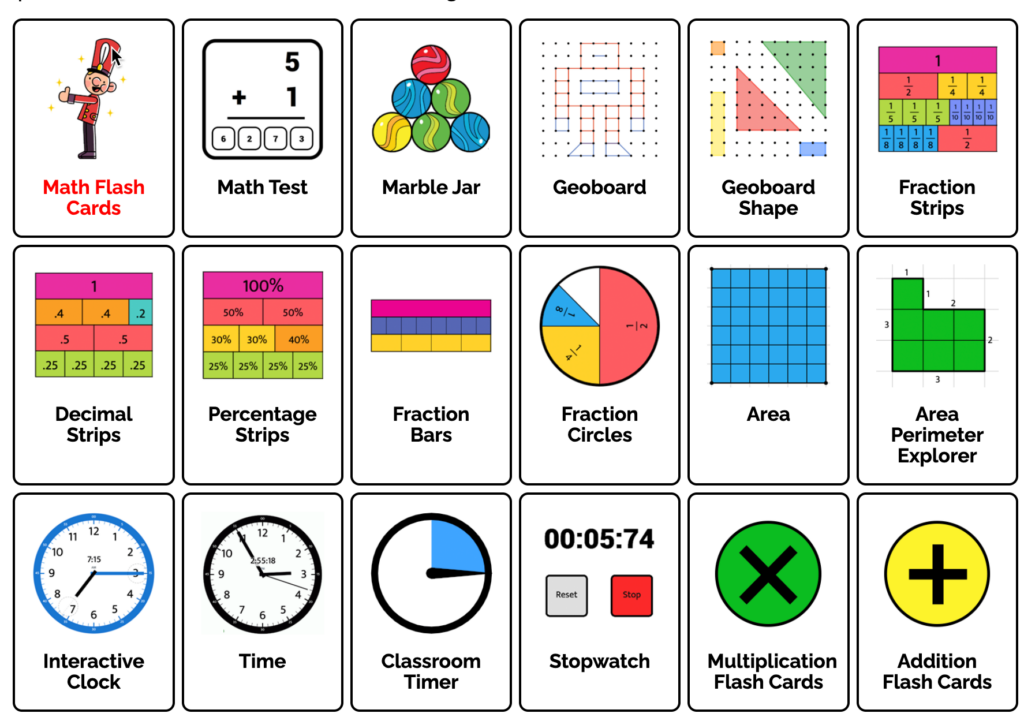
Toy Theater is a free educational website for elementary students. It includes math games, literacy activities, art tools, puzzles, virtual manipulatives, and simple classroom management tools.
What makes Toy Theater particularly useful for teachers is its collection of digital manipulatives. You will find fraction strips, number lines, ten frames, counters, pattern blocks, algebra tiles, clocks, play money, graphs, and many other resources that can be displayed on a smartboard or used independently by students.
The website does not require students to create accounts, and its main resources are free. This makes it easy to open a tool during a lesson without setting up a class or entering student information.
In this Toy Theater review, I will take you through its current features, classroom uses, privacy practices, benefits, and limitations.
Toy Theater at a Glance
| Feature | Details |
|---|---|
| Recommended audience | Elementary students |
| Main subjects | Math, language arts, art, and music |
| Virtual manipulatives | Yes |
| Teacher tools | Yes |
| Cost | Free |
| Student account required | No |
| Teacher dashboard | No |
| Student progress reports | No |
| Advertising | Yes |
| Device access | Computers, tablets, and mobile devices |
| Best suited for | Classroom demonstrations, math centres, and practice |
What Is Toy Theater?
Toy Theater is an educational website that has been online since 2001. According to its About page, it focuses on early learners and receives more than one million users each year.
The website was created by artist, designer, and developer Joel Gaspard. Its original goal was to use interactive media to create accessible educational activities for children.
Toy Theater now has several major content areas:
| Learning resources | Classroom resources |
|---|---|
| Math games | Virtual manipulatives |
| Language arts games | Timers |
| Art activities | Spinners |
| Music activities | Dice |
| Puzzles | Assessment activities |
| General games | Flash cards |
The site’s simple design is one of its strengths. Most activities open directly in the browser and do not require lengthy instructions. This works well when a teacher needs a visual tool in the middle of a lesson.
Toy Theater Virtual Manipulatives
The virtual manipulatives are the strongest part of Toy Theater. They allow students to move, arrange, compare, and group digital objects in much the same way they would use physical classroom materials.
Number and Operations Tools
Toy Theater has several manipulatives for teaching number sense and arithmetic.
| Number tools | Arithmetic tools |
|---|---|
| Number lines | Addition visualizer |
| Hundreds charts | Subtraction visualizer |
| 120 chart | Multiplication chart |
| Number paths | Arrays |
| Place value charts | Part part whole models |
| Number bonds | Math flash cards |
| Rekenreks | Math tests |
| Abacus | Calculators |
Teachers can use these tools to model counting, skip counting, addition, subtraction, multiplication, place value, and number relationships.
For example, the number line tools allow students to make jumps along a line. This can help them see addition and subtraction as movement instead of treating each operation as an isolated rule.
Fraction, Decimal, and Percentage Tools
The fraction collection is quite extensive.
| Fraction tools | Related tools |
|---|---|
| Fraction strips | Decimal strips |
| Fraction circles | Percentage strips |
| Equivalent fraction circles | Fraction bars |
| Equivalent fraction bars | Fraction number lines |
| Fraction addition visualizer | Area models |
These tools can help students compare fractions, identify equivalent values, connect fractions with decimals and percentages, and model fraction addition.
They are particularly useful on an interactive whiteboard. A teacher can move the pieces while asking students to predict which fractions will cover the same amount of space.
Geometry and Measurement Tools
Toy Theater includes tools for shapes, angles, area, perimeter, time, temperature, and length.
| Geometry | Measurement |
|---|---|
| Geoboard | Interactive clock |
| Pattern blocks | Rulers |
| Tangrams | Thermometer |
| Protractor | Stopwatch |
| Angle tool | Area and perimeter explorer |
| Pentominoes | Play money |
| Tetrominoes | Scale |
| Coordinate graph | Time activities |
The geoboard can be used to create and compare shapes, investigate symmetry, and explore perimeter and area. Pattern blocks and tangrams are useful for geometry, spatial reasoning, and composing larger shapes from smaller ones.
Play Money and Currency Tools
Toy Theater has digital play money for several countries and regions, including Canada, the United States, the United Kingdom, Australia, New Zealand, Europe, India, Mexico, Brazil, and Singapore.
This is a thoughtful feature for an educational site with an international audience. Teachers can choose money that matches the currency students use in their own community.
The money tools can support lessons on:
| Early skills | Applied skills |
|---|---|
| Recognizing coins | Making a purchase |
| Comparing values | Calculating change |
| Counting money | Creating different combinations |
| Sorting coins | Solving money problems |
The Canadian money option will be especially useful for teachers working in Canada, since many educational websites provide only American coins and bills.
Literacy Tools
Toy Theater has expanded its teacher resources beyond mathematics. Its current literacy collection includes alphabet tiles, word family activities, digraph and trigraph tools, morphology tiles, Elkonin boxes, and a syllable builder.
| Early literacy | Vocabulary and grammar |
|---|---|
| Alphabet tiles | Synonyms |
| Alphabet cards | Antonyms |
| Digraph tiles | Homophones |
| Trigraph tiles | Verb tense |
| Word family tiles | Subject and verb agreement |
| Elkonin boxes | Adverbs and adjectives |
| Syllable builder | Prepositions |
| Picture cards | Sentence building |
Elkonin boxes can help students separate spoken words into individual sounds. Alphabet and digraph tiles can then be used to connect those sounds with letters.
The morphology tiles are also worth exploring. They can help students examine roots, prefixes, suffixes, and the way meaningful word parts combine.
Classroom Management Tools
Toy Theater includes simple tools that teachers can open during everyday classroom activities.
Classroom Timer
The classroom timer can be projected while students work independently or complete a group activity. A visible countdown helps students understand how much time remains.
Spinner
Teachers can create random selections using a standard spinner, multiple spinners, or a weighted spinner. The tool can be used to select students, questions, topics, or numbers.
Dice and Coin Flips
Digital dice, playing cards, random numbers, dominoes, and coin flips can support lessons involving probability, arithmetic, and classroom games.
Marble Jar
The Marble Jar provides a visual way to track progress toward a shared classroom goal. Teachers can add marbles as students complete tasks or demonstrate agreed classroom behaviours.
These tools are simple, but that is precisely why they are useful. They do not require a registration process or complicated setup.
Toy Theater Games
Toy Theater has games in math, language arts, art, music, and general problem solving.
Popular examples include Basketball, Feed Freddy, Fruit Fall, Tic Tac Toe, Cube, Build, Spin, and Cause and Effect.
The math games cover areas such as counting, numeral recognition, addition, multiplication, division, patterns, and telling time. Literacy activities include letter recognition, spelling, grammar, and reading.
The games are generally better suited to elementary students, although some of the manipulatives can also support older learners who need visual models.
Teachers should preview each game before assigning it. Some provide focused academic practice, while others are better suited to indoor recess or an early finisher activity.
Art and Music Activities
Toy Theater’s art section gives students tools for drawing, colouring, pattern creation, animation, and exploring symmetry. The music activities allow children to experiment with sound and play simple songs using an online keyboard.
These activities can be used during art and music lessons, but they also have cross curricular possibilities.
A symmetry drawing tool can reinforce a geometry lesson. A pattern activity can connect visual art with mathematical sequences. Students can also use the art tools to create illustrations for a story or design a visual response to a topic.
Ways to Use Toy Theater in Class
Model a Concept for the Whole Class
Open a manipulative on the smartboard and use it during direct instruction. Students can suggest how to move the pieces or explain what the model represents.
Create a Math Centre
Select a virtual manipulative or game for one station in a classroom rotation. Provide students with a specific task rather than asking them to browse the website.
Support Small Group Instruction
Use fraction strips, counters, number lines, or place value tools while working with a small group. The digital materials are helpful when physical manipulatives are unavailable.
Build Number Talks
Display an array, ten frame, number line, or collection of counters. Ask students what they notice and how they calculated the total.
Explore Probability
Use the dice, coin flip, cards, or spinner tools to generate data. Students can record results and compare experimental probability with their predictions.
Practise Phonics
Use alphabet tiles, Elkonin boxes, and word family tools to build and change words during literacy instruction.
Manage Classroom Routines
Display the timer during independent work, use a spinner to select a topic, or track a shared goal with the Marble Jar.
Is Toy Theater Free?
Toy Theater describes its main website as entirely free. Students can open and use the games, activities, and manipulatives without registering.
The website is supported by advertising. It uses Google AdSense and states that advertisements are contextual rather than targeted.
A membership login is available through a separate area of the site, but the core resources reviewed here remain openly accessible. Since membership options can change, users should check the current site directly if they are interested in account based access.
Does Toy Theater Track Student Progress?
Toy Theater does not provide a teacher dashboard, student profiles, assignments, or class reports.
Teachers cannot use the site to monitor which activities students completed or how their performance changed over time. Individual games may show immediate scores or feedback, but this information is not collected into a class record.
This makes Toy Theater more suitable for teaching, modelling, and informal practice than for assessment or long term progress tracking.
Teachers who need automatic reports may prefer IXL, SplashLearn, or Prodigy Math.
Privacy and Advertising
Toy Theater states in its privacy policy that it does not knowingly ask for or collect names, email addresses, or other personally identifying information from children under 13, except where permitted under COPPA.
The service automatically collects some technical information, including IP addresses, device information, browser details, visited pages, search terms, and time spent on the site. The company says this information is used to operate, secure, analyse, and improve its services.
Toy Theater also states that it does not use targeted advertising. Ads on the free website are contextual.
The current privacy policy has an effective date of November 5, 2020. Since the policy is several years old, schools should review it alongside their own privacy requirements before using the site with students.
Advantages and Limitations
| Advantages | Limitations |
|---|---|
| Main resources are free | Free site contains advertisements |
| No student account required | No teacher dashboard |
| Large manipulative collection | No student progress reports |
| Tools work across devices | No personalized learning path |
| Includes math and literacy tools | Some games have limited instructional depth |
| Useful on interactive whiteboards | Teachers must select activities manually |
| Supports several currencies | Privacy policy has not been recently updated |
| Includes classroom management tools | Not a complete curriculum |
Toy Theater Compared with Similar Platforms
| Platform | Best suited for |
|---|---|
| Toy Theater | Virtual manipulatives and simple teacher tools |
| Math Playground | Math games, visual models, and problem solving |
| ABCya | Subject based games for elementary students |
| Coolmath Games | Logic, strategy, and recreational games |
| Prodigy Math | Adaptive practice inside a fantasy game |
| IXL | Structured practice and progress reporting |
| Education.com | Games, worksheets, and lesson resources |
Toy Theater is the stronger choice when a teacher needs a digital number line, fraction model, geoboard, timer, spinner, or other interactive classroom tool. It is less suitable when the goal is to assign a sequence of activities and monitor each student’s progress.
Is Toy Theater Worth Using?
Toy Theater is worth bookmarking, especially for elementary math instruction. Its games are useful, but the virtual manipulatives are where the platform stands out.
Teachers can quickly open a model, project it for the class, and demonstrate an idea without searching for physical materials. Students can also use the same tool independently or with a partner.
I would use Toy Theater for direct instruction, guided practice, math centres, phonics activities, and classroom routines. I would not rely on it for assessment or curriculum planning because it does not provide a learning sequence or student reports.
Final Thoughts
Toy Theater is one of those websites that can look quite simple until you begin exploring its teacher tools. Behind the games is an extensive collection of digital manipulatives for number sense, fractions, geometry, measurement, money, data, phonics, and grammar.
The site is free, easy to access, and does not require student accounts. Its main limitations are advertising and the absence of progress tracking.
For teachers, the best approach is to select a specific tool in advance and connect it to a clear instructional purpose. Used this way, Toy Theater can be a practical addition to both math and literacy lessons.


